
A sales receipt template helps a seller record a completed payment for goods or an identified sale. It gives the customer a readable account of what was purchased and gives the business a supporting record for its sales process. The details should match the actual transaction, not merely look like a professional receipt.
This page contains one preview and one local ZIP link named as a Word sales-receipt resource. Check the archive’s contents and editing format before using it. The preview and original file link are retained below, followed by questions about payment status, corrections, and customer records.
Use the template for a genuine transaction you are authorized to document. A blank receipt is not proof that money changed hands, and it should not be used to manufacture evidence of a purchase. The appropriate fields and requirements can vary by business, payment method, and jurisdiction.
Know when a receipt is the right document
A receipt records payment received or a completed transaction under the business’s process. An invoice usually requests payment. A quotation describes proposed pricing before the sale. Keeping those purposes clear prevents a customer from mistaking an unpaid amount for a settled purchase.
For a service that still needs to be billed, a service invoice template may be more suitable. Once payment is received, the business can record it against the invoice and provide the appropriate receipt or confirmation.
If only part of the amount has been paid, state the payment received and the remaining balance accurately. Do not mark the whole sale “paid in full” when an amount is outstanding. A deposit acknowledgment should not imply that all goods have been delivered unless that is true.
A refund or return creates another record event. Preserve the original sale and document the adjustment through the business’s process rather than erasing the transaction and leaving no explanation.
Fields that identify the sale
Show the seller’s name and an appropriate contact method. Include any business identifiers required for the situation, but do not copy sample registration details from the template. Branding should identify the real seller, not imitate an unrelated business.
Assign a receipt number or transaction reference using a consistent method. A reference helps connect the customer’s copy to the business record. Avoid issuing the same number for unrelated sales because you are reusing the layout.
Record the transaction date and, where useful, time. If the receipt is issued later than the payment, distinguish the payment date from the issue date when that matters. Do not backdate a document to create a misleading account.
Identify the items or service clearly enough to understand the sale. A short product name, quantity, unit price, and line amount are often useful. “Goods” may be too vague when a customer later needs to identify what was purchased.
Include the total amount and currency. If applicable taxes, delivery charges, or discounts form part of the transaction, show them accurately in the appropriate way. The template does not determine which tax applies or whether your business must collect it.
Payment information without unnecessary exposure
State the payment method at a useful level, such as cash, card, or bank transfer, and use the appropriate transaction reference where needed. Do not print full card numbers, security codes, banking passwords, or unnecessary account details on an ordinary receipt.
For cash payments, record the actual amount and any change given when that is part of the business process. A cash receipt template may provide a more focused layout for documenting money received.
For a card or transfer payment, use the authorized payment system’s record to confirm the transaction. A manually filled template does not confirm that a payment was approved, settled, or free from later reversal.
If the receipt includes customer information, collect and display only what is needed for the transaction and applicable requirements. A routine sale does not automatically need a customer’s full home address or private identifiers.
A simple worked example
Suppose a customer purchases three notebooks at 8 currency units each and two folders at 3 each. The item subtotal is 30: 24 for notebooks and 6 for folders. An authorized fixed discount of 5 reduces the pre-tax amount to 25.
The receipt should show the quantities and prices so the customer can check that calculation. If applicable tax or another permitted charge is added, calculate it according to the actual requirements and label it accurately. This example does not assume a tax rate.
If the customer pays 25 in full and no other amount applies, the receipt can identify that payment and a zero outstanding balance. If the customer pays only 10 under an agreed deposit arrangement, show 10 received and the remaining amount separately.
If a folder is later returned, document the return and refund or credit through the appropriate process. Do not quietly change the original receipt to show that the folder was never sold.
The arithmetic is simple, but the example illustrates why item detail, adjustments, payment received, and balance are separate concepts. A clear layout makes those concepts visible.
Customize the available resource
Open the archive through your normal trusted-file process and identify the actual document included. Save an editable working copy and retain the original resource for reference. A ZIP extension describes the container, not every file inside it.
Replace the sample seller name, address, contact details, receipt number, dates, and item descriptions. Check all repeated areas, including headers and footers. Remove any sample payment instructions that do not apply.
Choose a layout with enough space for the transaction detail you need. A single-item receipt can be compact; several products need a readable item table. Do not reduce the text until amounts and labels are difficult to distinguish.
Check the final version at the size you will print or send. Long product descriptions should not cover a price or push the total onto a separate page without context. If you export the file, open the exported version before sending it.
If you use a document editor rather than a spreadsheet, calculate and review totals separately. Do not assume the template contains working formulas merely because a total field appears.
Customer copies and business copies
Give the customer the receipt or confirmation through the appropriate channel and keep a business record. The two should describe the same transaction. If a digital copy is issued, use a recognizable file name and confirm the destination when personal information is included.
A sales log template can help summarize transactions by reference and amount. The log does not replace the detailed receipt; it helps organize the record. Keep the figures consistent so totals can be traced to their supporting documents.
For United States businesses, IRS recordkeeping guidance identifies receipts and other transaction documents as support for entries in business records. That is a recordkeeping role, not a guarantee that a particular template satisfies every tax requirement.
Store records in an orderly and appropriately protected way. Retention periods and required details depend on the situation. Use the business’s applicable process rather than adopting an arbitrary period from a generic example.
Returns, exchanges, and warranties
A receipt can help identify a purchase when a customer requests a return, exchange, or warranty service. It does not automatically determine the customer’s rights or the seller’s obligations. Those may depend on applicable law, the product, and the actual terms.
If you include a policy reference, keep it accurate and accessible. Do not insert a blanket “no returns” statement simply because another receipt uses it. Review the wording under the business’s approved process.
Separate evidence of payment from evidence of delivery or condition. A payment receipt may not prove that every item was delivered or inspected. Use the appropriate delivery or service record when those details matter.
If a customer reports an error, check the original transaction and respond through the normal process. A correction should explain what changed without creating conflicting copies that both appear final.
Correct mistakes transparently
A wrong date, amount, item description, or payment status should be corrected in a traceable way. Follow the business’s process for voiding, reissuing, or recording an adjustment. Keep a link to the original reference where appropriate.
Do not reuse a canceled receipt number for a different sale without an established method that prevents confusion. A numbering gap with an explanation is preferable to an unexplained duplicate.
If you provide a replacement copy of a genuine receipt, identify it as a copy or duplicate under the business’s process. Do not imply that a new payment occurred merely because the document was reprinted.
Keep the correction consistent across the receipt, sales log, payment record, and any relevant invoice. Fixing only the customer’s copy can leave the business record inaccurate.
Review before issuing
Check the seller identity, transaction reference, date, item detail, arithmetic, currency, payment received, and balance. Confirm that the payment information comes from the actual transaction rather than an assumption.
Remove unused placeholders and private details that are not needed. Make sure the total and payment status are easy to find. A clear receipt helps both parties understand the transaction and gives later reviewers a record they can trace.
The preview below supplies a starting layout. The credibility of the finished receipt comes from accurate transaction information and the seller’s record process, not from its visual design.
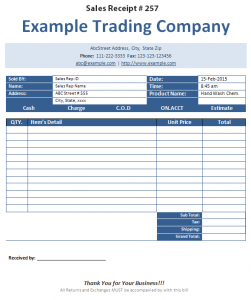

Sales receipt questions
Is a sales receipt the same as an invoice?
No. A receipt records payment or the completed transaction under the seller’s process. An invoice normally requests payment. Keep any unpaid balance clear.
Can I issue a receipt for a deposit?
Yes, when it accurately records the amount received. Identify the deposit and remaining balance instead of marking the entire purchase as paid.
Does a receipt guarantee a return or refund?
No. It can help identify the purchase, but rights and obligations depend on the circumstances, applicable requirements, and actual terms.
Should a receipt show full card details?
Do not include full card numbers, security codes, or access credentials in an ordinary receipt. Use the appropriate payment-system reference and required limited information.
What file is available here?
The page has one local ZIP resource named as a Word sales-receipt template. Check the archive contents for the actual document and editing format.
How should I handle a replacement copy?
Reproduce the genuine transaction accurately and identify it as a copy or duplicate under the business’s process. A reprint should not imply a new sale or payment.
