
A sales log template records sales transactions over a defined period. Choose whether rows represent items, orders or transactions, and apply that basis consistently. Keep refunds and corrections traceable and distinguish sales value from cash collected or profit.
Compare actual sales with a sales plan, review approved prices in a price list and connect sold quantities to an inventory spreadsheet. Carry transaction references across records so stock movements and sales totals can be checked together.
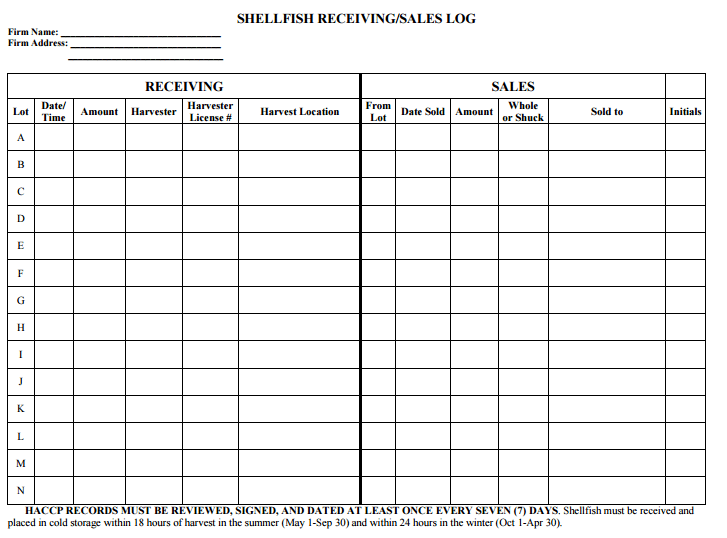
The five previews below include a general sales tracker, an external Microsoft template destination, and government-hosted resource links. Three previews have links; two download graphics are unlinked. The Minnesota LG820 resource is a specialized raffle inventory and sales form, while the Maine destination is a receiving-and-sales-log PDF path. These are not interchangeable generic retail spreadsheets.
Use a general sales log to summarize the transactions relevant to your business. Do not assume it is a complete profit-and-loss statement, a sales-lead pipeline, or a compliant record for a regulated activity. Those purposes need different information and, where applicable, their own required processes.
Define the event you are recording
Decide whether a row represents an order, an invoiced sale, a completed payment, or an individual item. Each choice can be valid for a particular purpose, but mixing them makes totals unreliable.
For a simple completed-sales register, a row might identify the transaction date, reference, amount, and payment status. For an item-level log, one transaction may occupy several rows. Ensure that the transaction total is not repeated and summed on every item row.
A sales enquiry is not a completed sale. If you want to track potential customers and next contact steps, use a separate pipeline or prospect record. Do not include a hoped-for sale in revenue totals simply because it appears in the same sheet.
Record the definition in the instructions so everyone uses the log consistently. A clear method is more useful than a complex layout whose labels mean different things to different people.
Fields for a transaction-based log
Include a date, unique transaction reference, and a description or category appropriate to the business. Use the reference to connect the row to the supporting document rather than copying every detail into the summary.
Separate gross amount, discounts or adjustments, applicable taxes where relevant, and the measure you intend to total. The labels should make clear whether the figure includes tax, delivery, or other charges.
If you record payment status, distinguish paid, partly paid, and outstanding. A check received and a payment cleared may be different stages under your process. Do not label all invoices paid merely because they have been issued.
A customer reference can be useful, but collect only the information needed. Avoid storing full card details, private identifiers, or unnecessary personal contact information in a widely shared sales sheet.
A product or channel category can help review activity later. Define the categories consistently; “online,” “website,” and “web” should not become three different groups if they mean the same channel.
Connect the log to supporting records
A sales receipt template can document a genuine completed payment or transaction. The log summarizes the reference and amount, while the receipt holds the detail. Keep the two consistent.
If sales are invoiced before payment, retain the invoice and payment record under the business’s process. Do not use the log’s status field as the only evidence that money was received.
For United States recordkeeping, IRS guidance identifies receipts, invoices, and other transaction documents as support for business-record entries. A summary log therefore should remain traceable to the underlying records rather than replace them.
Keep adjustments identifiable. A refund, cancellation, or correction should refer to the original transaction so a reviewer can understand its effect. Do not silently delete a sale and leave the totals without an explanation.
A worked daily-sales example
Suppose a fictional shop records three completed transactions before tax: 40, 65, and 25 currency units. The day’s sales amount under that definition is 130.
If the 65 transaction includes an authorized discount of 5 already reflected in the recorded amount, do not subtract the discount again when summing net sales. Your column definitions should state whether amounts are before or after discounts.
If a refund of 10 is recorded for a previous purchase, identify it as a refund with the original reference. Depending on the chosen reporting method, the period summary may show sales of 130 and refunds of 10, giving 120 after that adjustment.
The payment record might differ from the sales record if an amount remains outstanding or a payment settles in another period. A sale, cash received, and money deposited are related but different measures.
These figures illustrate consistent definitions. They are not a full accounting treatment for every business. Use the organization’s accounting process for actual financial reporting and tax decisions.
Sales totals do not establish profit
A sales log usually emphasizes transactions and revenue-related amounts. Profit also depends on relevant costs and the accounting treatment used. High sales can coexist with a loss.
A profit and loss statement template is a related resource for organizing income and expense information. The sales log can supply part of that information, but it does not provide every expense merely because it records all sales.
Likewise, a sales trend alone does not establish the overall market trend. A change in your own activity may reflect pricing, stock availability, opening hours, channel changes, or other factors. Investigate the context before describing a wider market as growing or shrinking.
Compare like periods and measures. A five-day trading week should not be compared with a seven-day period without accounting for the difference. A total including tax should not be compared with a total excluding it as though they were identical.
Inventory and quantities
If your log includes quantities sold, use an identifiable product reference and unit. “Three boxes” and “three individual items” are not the same measure. Keep units consistent with the stock record.
An inventory template can help record stock movements separately. A sale may reduce inventory, but returns, damage, transfers, and receipts can also affect stock. Do not assume that sales alone explain every change in quantity on hand.
If one transaction contains several products, choose an item-level record or a separate detail source. Avoid entering a single ambiguous product label for a mixed order when item quantities matter to your review.
For regulated goods or activities, use the required records and instructions. A generic log cannot replace a specialized traceability or reporting form simply because both contain sales columns.
Understand the specialized gallery resources
The Minnesota Gambling Control Board identifies LG820 as the raffle inventory and sales log used for its raffle recordkeeping context. Its purpose is specialized, and the current official instructions should guide any actual use. It is not a general substitute for a shop’s daily sales spreadsheet.
The gallery’s Maine link is a government-hosted receiving-and-sales-log destination. Its suitability depends on the intended activity and current source instructions. Confirm the current resource and applicable instructions with the source before treating it as suitable for your activity.
The Microsoft destination may lead to a template page or a changed service. Check the actual resource’s current availability and format. The presence of a download graphic does not establish that the destination supplies a working file.
The two unlinked graphics remain part of the original gallery. They do not provide an attached download. Choose among resources that are actually available and appropriate rather than assuming every preview has equivalent functionality.
Maintain the sheet consistently
Enter transactions through the normal process and review the log for missing or duplicate references. If several people contribute, agree on the current file or record location and who is responsible for checks.
In a spreadsheet, keep all fields for one row together when sorting. Check formula ranges after adding rows or columns. A new row outside the total range can make the sheet appear correct while omitting a sale.
Do not assume a template’s calculations are error-free. Review representative entries and totals against the supporting records. A static image or PDF has no automatic spreadsheet calculation merely because it looks like a table.
Use a consistent date format, currency, category vocabulary, and status method. If the process changes, identify the change so later comparisons can be interpreted appropriately.
Review and act on the record
Choose a review period that fits the business’s purpose. Daily review may help identify recording gaps, while a weekly or monthly summary may be more useful for a broader pattern.
Investigate unusual entries with the supporting documents before concluding that they represent a real trend. A duplicate sale, missing refund, or changed category can distort a summary.
Keep private information appropriately protected and share only what the recipient needs. A management summary may not need customer names or payment references. Retain the detailed log under the applicable process.
A well-maintained sales log supports traceable summaries and practical review. It does not guarantee complete records, calculate profit by itself, or establish that a business is performing well without further information.
Download Sales Log Templates Here
Sales Log Sample
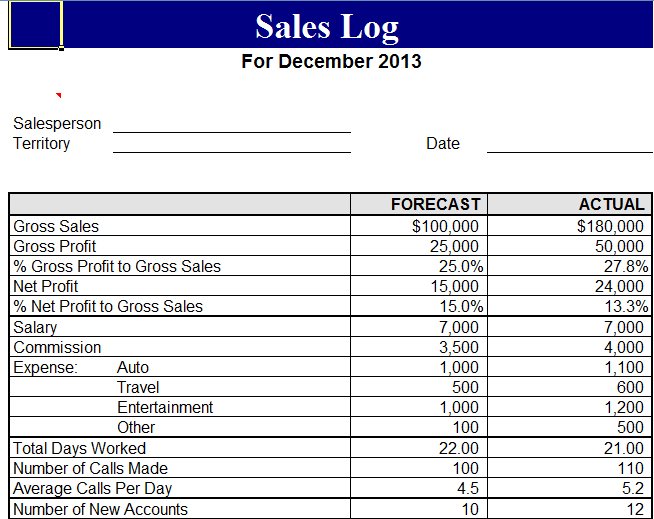

Sales Log/Tracker
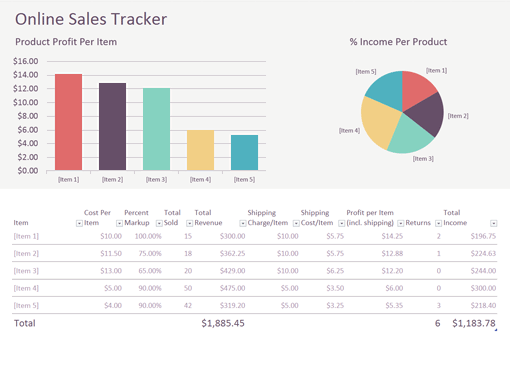
Sample Sales Log
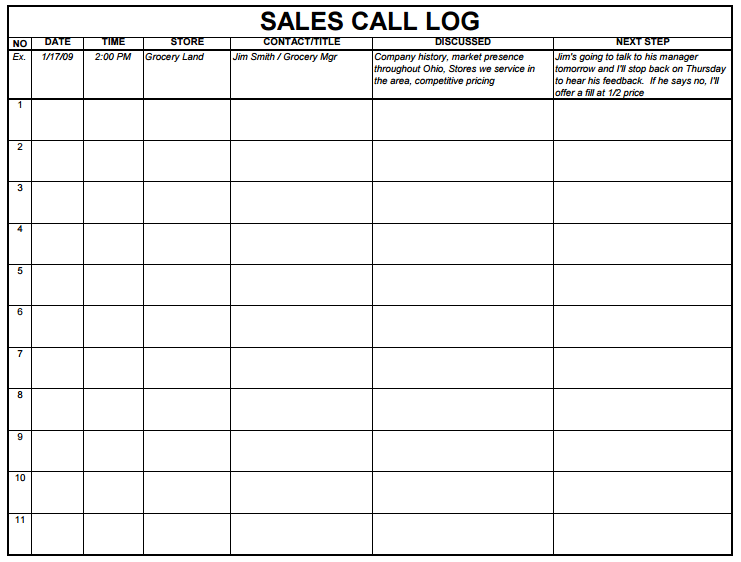
Sales Log Example
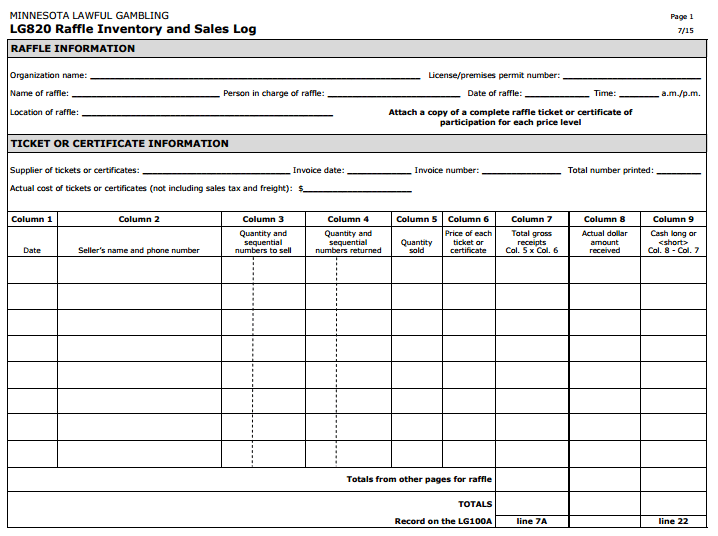
Company Sales Log
Sales log questions
Should I include sales leads in the same total as completed sales?
No. A potential sale is a different stage. Keep pipeline activity separate or clearly distinguished so it is not counted as completed revenue.
Does a sales log show profit?
Not by itself. Profit depends on relevant costs and accounting treatment. The sales log provides transaction information, not a complete income statement.
How should I record a refund?
Use the business’s process, identify it as an adjustment, and connect it to the original transaction. Do not silently remove the sale without a trace.
Are all five gallery resources linked spreadsheets?
No. Three previews have external destinations and two graphics are unlinked. The collection also includes specialized government resources.
Is the LG820 form a general shop sales log?
No. The Minnesota Gambling Control Board identifies it as a raffle inventory and sales log in its specific recordkeeping context. Follow the current official instructions for actual use.
Why can sales and cash received differ?
A sale may be unpaid, partly paid, settled later, or adjusted. Define the measure being recorded and keep the supporting payment information available.


