
A service invoice template connects an amount due to recognizable work, agreed pricing units and approved changes. Show billable services clearly, identify deposits already allocated and distinguish the invoice total from the remaining balance. Check the customer, dates and reference numbers before issuing it.
Refer to the accepted quotation, choose a contractor invoice layout for detailed labor and materials, and use a cash receipt when acknowledging received cash. A quote proposes a price, an invoice requests payment and a receipt records a payment event.
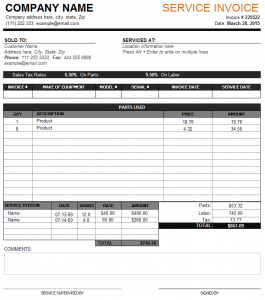
The resource below is one service-invoice preview linked to a ZIP archive whose name identifies a DOC-oriented template. Review the contents after obtaining the resource rather than assuming the archive itself is a Word file or that it contains working calculations. The layout is a starting point; required invoice details depend on the business and its applicable rules.
Use the invoice for billing. Reference the agreed service order or relevant work order so the customer can understand the service and approved changes. The source record explains the assignment or agreement, while the invoice identifies the billable items and the payment request.
What Is a Service Invoice?
A service invoice is a commercial document issued by a service provider to a customer to request payment for services provided. It can be used for professional services such as consulting, accounting, legal work, cleaning, repairs, design, maintenance, freelancing, construction, and many other service-based businesses.
A well-prepared service invoice form clearly explains what the customer is being charged for. This can help prevent confusion about the work completed, amount payable, payment deadline, and agreed terms.
What Should a Service Invoice Include?
A professional service invoice template commonly includes the business name and contact information, customer details, invoice number, invoice date, service description, quantity or hours, rate, subtotal, applicable taxes, total amount due, payment terms, and payment instructions.
Service providers can adapt these sections according to their particular business. For example, a consultant may list project hours and hourly rates, while a contractor may describe individual services and associated charges.
Free Service Invoice Template for Small Business
A free service invoice template is especially useful for small businesses and independent professionals who want a simple way to create professional invoices without purchasing expensive invoicing software. The template can be customized in a suitable editing program and reused for different customers and transactions.
Using a consistent invoice format also makes business records easier to organize. Each invoice can have a unique number, customer information, service details, and payment status, helping you maintain a reliable record of your sales and outstanding payments.
Service Invoice Template for Freelancers and Contractors
Freelancers, consultants, contractors, repair professionals, and other independent service providers frequently need to invoice customers after completing work. A service invoice template for freelancers can make this process faster by providing a structured format for describing services and calculating charges.
Contractors can use a similar contractor invoice template to document labor, services, materials, and other applicable charges. Keeping invoices clear and detailed can make it easier for customers to understand the final amount due.
Service Invoice vs. Receipt
A service invoice and receipt are related but serve different purposes. An invoice generally requests payment or records an amount owed for services, while a receipt normally confirms that payment has already been received.
A business may therefore issue a service invoice first and provide a receipt after the customer pays. Maintaining both documents can help create a complete record of the transaction.
How to Create a Professional Service Invoice
Start by adding your business name, logo, address, telephone number, and email address. Enter the customer’s information and assign a unique invoice number and date. Describe each service clearly and include the applicable rate, quantity, hours, or fixed price.
Calculate the subtotal, taxes, discounts, and final amount accurately. Then include payment terms and instructions so the customer knows when and how payment should be made. Review the completed invoice before sending it to ensure all information and calculations are correct.
A well-organized printable service invoice template can provide a professional appearance while making routine billing faster and more consistent.
Describe billable services in recognizable terms
Use a description that the customer can match to the agreed work. “Maintenance visit for order SO-420, completed 12 March” gives more context than “services.” Add the billing period or milestone where that is the actual basis. Avoid copying a technical log in full if a concise, accurate description and reference explain the charge.
State the pricing unit. Hourly work needs the billable hours and rate; a fixed-price milestone needs its agreed amount and description. Do not combine hours and a fixed project fee in a way that charges twice for the same work. If several services are billed on different bases, use separate rows with their own quantities or units.
Only include approved additional work or charges that the actual arrangement supports. A note that a technician spent extra time is not, by itself, evidence that every extra hour is billable at a particular rate. Check the agreement and the supporting work record before adding a new line. If a charge is still disputed or awaiting review, follow the business’s actual billing process rather than inventing an approval.
Fictional example: hours, an approved expense, and a deposit
In an invented consulting assignment, the approved billable work is six hours at 50 per hour, giving a service subtotal of 300. An approved reimbursable expense of 20 makes a subtotal of 320 before any applicable tax or other charges. These figures illustrate arithmetic, not market rates or a recommended billing policy.
The customer previously paid a confirmed deposit of 100 that the business applies to this invoice. Show that payment separately from the service subtotal so the reader can see both the charge and the amount remaining. In this simplified example with no other adjustments, 320 less 100 leaves 220 due. Do not make the service appear to cost only 220 by concealing the deposit allocation.
Use a payment history record to trace the deposit and later payments by their references. An invoice stating that payment is due is not confirmation that it was received. Likewise, an earlier authorization or an attempted payment should not reduce the balance until the actual payment record supports the allocation.
For a partial later payment of 120, the remaining balance in this simplified example becomes 100. Record the date and reference of the payment and preserve the invoice’s original billed amount. The sequence now explains the original 320 charge, the 100 deposit, the 120 later payment, and the remaining 100 without changing the historical service rows.
Make dates and terms unambiguous
An invoice date identifies when the document was issued. A service date or period identifies the work being billed. A due date identifies the payment deadline under the actual agreement. Keep those fields distinct instead of using a single date labeled “date” for all three facts.
Write the actual agreed payment terms and route. If your process uses a defined due date, display it clearly and check that it matches the terms. Do not add a late fee, interest clause, or cancellation charge simply because another sample includes one. The invoice should reflect the arrangement and applicable requirements, with review when the terms need legal or financial interpretation.
Australian business.gov.au guidance distinguishes regular and tax invoices according to the business’s GST registration. That is a useful reminder that a generic template does not establish the invoice type or tax details appropriate in every jurisdiction. Check the rules relevant to your business and use the actual applicable treatment rather than copying a historical tax field or rate.
If a customer requires a purchasing reference, department, or billing address, confirm that information before issuing the invoice. An otherwise correct invoice can be delayed if it is sent to the wrong account or lacks the reference needed for the customer’s review. Keep administrative identifiers clear without adding unrelated personal details.
Handle revisions without losing the billing history
Check the draft before sending it: customer, service scope, references, quantities, rates, totals, taxes where applicable, payment allocations, and contact route. Review the final exported or printed copy as well as the working document. Long descriptions and totals should remain readable; a correct value hidden outside the print area is not useful to the customer.
If an issued invoice needs correction, use the business’s approved revision or adjustment process. Identify the original invoice and the reason for the change. Do not silently overwrite the sent copy and leave different totals under an indistinguishable number. The customer and staff need to know which document is current and how it relates to the earlier bill.
Keep the clean master separate from issued invoices. Remove previous customer data, signatures, actual payment references, and amounts before preparing a new invoice. Assign the new invoice’s own identifier according to the real numbering process. An editable layout can save preparation time, but it cannot check the agreement, prove service delivery, or verify payment on its own.
Download Free Service Invoice Template:

Frequently Asked Questions
What format is linked for this invoice?
The current destination is a ZIP archive with a DOC-oriented filename. Review the actual archive contents before selecting an editor or assuming its calculation features.
Does an invoice prove payment was received?
No. It requests or records a billed amount. Record actual payments separately with their supported dates and references.
How should I show a deposit?
Show the billed services and the confirmed payment allocation separately. That lets the customer understand the original charge and the remaining amount due.
Can I mix hourly and fixed-price services?
Use separate rows with clear descriptions and pricing units where the agreement supports both. Check that the same work is not charged twice.
What dates should I distinguish?
Keep the issue date, service date or period, and payment due date separate when all three matter. Each describes a different event or requirement.
Is the template automatically a valid tax invoice?
No. Required details and invoice types depend on the business and applicable rules. Review the relevant requirements instead of copying tax labels or rates from a sample.
Can I add an extra charge because it appears in the template?
Only use charges supported by the actual arrangement and applicable requirements. A sample field does not establish customer agreement or billing authority.
How should I correct an issued invoice?
Use the approved revision or adjustment process, reference the original, explain the change, and preserve the billing history so the current document is identifiable.
