
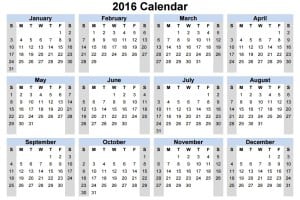
This printable 2016 calendar template is an archived year-specific resource for reviewing dates in 2016. It can be useful when organizing historical notes, reconstructing a past schedule or preparing a retrospective record. It should not be presented as an upcoming-year planner or used unchanged for a different year’s dates.
The page contains one calendar preview and a local link with a PDF filename. It does not provide a confirmed Excel workbook. The preview and original resource link remain below this guide. Inspect the selected PDF in a suitable viewer before deciding whether its layout fits the historical reference you need.
A blank calendar provides space for your own notes; it does not independently verify when an event happened. Use dated supporting records to establish the event, then use the calendar to see its place within a month or week. Keep any uncertain date clearly marked so a reconstructed schedule does not look like an original contemporaneous record.
Confirm that the reference year is correct
The year 2016 was a leap year with 366 days. January 1 fell on Friday, February included Monday, February 29, and December 31 fell on Saturday. Those points can help you check a calendar grid’s alignment when using or recreating a year-specific layout.
A calendar for another year cannot be made accurate merely by changing its heading to 2016. Weekday alignment and February’s length need to match the year. Likewise, changing the heading on this resource to the current year would not make its printed date positions correct.
If you are planning current activities, choose or create a calendar for the required year. A daily schedule can organize a particular day’s planned activities, while this page supplies a historical calendar reference. Match the date system to the task before entering commitments.
Use the calendar for retrospective organization
A historical calendar can help arrange notes already supported by documents. For example, a project review might identify the dates of meetings, deliveries or correspondence from the relevant records. The calendar can show their sequence without replacing the evidence behind them.
Separate the event date from the date you prepared the reconstruction. A note added today about an event in 2016 should not imply that the calendar was completed during 2016. Label the working copy as a retrospective reference and identify when it was prepared.
If the records disagree, preserve the uncertainty. Write date to confirm instead of choosing a date solely because it fits the expected sequence. A calendar is an organizing aid, not a reason to turn an assumption into a verified fact.
A fictional historical review example
Imagine a team reviewing an old project file. A dated message confirms that a planning meeting occurred on Monday, February 15, 2016. A later document records a follow-up on Monday, February 29. The team marks both dates and identifies the supporting document references in its working notes.
The calendar makes the two-week interval visible. It does not establish what happened at the meetings or prove that every project activity in between has been recorded. Those questions require the relevant notes and other records.
A daily activity log can organize detailed event descriptions if the review needs more than a calendar entry. Identify reconstructed entries as such and keep the source references clear. A newly prepared log should not be presented as an original record from the historical period.
Choose clear labels for notes
Use short entries that identify the event and a reference where needed. A long narrative squeezed into a date box can become difficult to read. If there is more detail, keep it in a separate note and use a consistent reference to connect the two.
Distinguish confirmed dates from approximate dates using a written label or a simple legend. If color is used, provide a text or symbol distinction that remains understandable on a monochrome printout. Avoid a system that only the person who prepared it can decode.
A task list can track outstanding research such as confirm delivery date or locate meeting notes. Keep those present-day research tasks separate from historical events on the calendar. Otherwise an action still to be completed may look like an event that happened in 2016.
Check the PDF and printed page
Open the linked resource in a suitable PDF viewer and inspect its actual page layout. A PDF may offer a fixed printable page rather than editable cells. The link’s extension does not establish interactive fields, Excel compatibility or a particular paper size.
Review the print preview for clipping, scaling and readable date boxes. If you need to write by hand, check that the final size leaves enough room. A small preview image on a website is not a reliable measure of the space available on the printed page.
Keep a blank copy separate from the completed historical working copy. If annotations are added digitally, inspect the saved result to confirm they appear where intended. Retain a clear filename identifying 2016 and the purpose of the document so it is not mistaken for a current planner.
Avoid unsupported holiday and deadline claims
Do not assume that a blank 2016 calendar includes every holiday or deadline relevant to a location. Holidays, observances and organizational schedules differ. If a historical holiday matters to the review, verify it through an appropriate record for the place and year involved.
A printed date does not establish the legal due date of a payment, filing or notice. If the review concerns an obligation, consult the underlying documents and rules that applied. The calendar can help display a confirmed date but cannot calculate or settle that obligation on its own.
Keep the final reference focused on its purpose. Check the year, date alignment, note meanings and supporting references. An accurate, clearly labeled historical calendar is more useful than an archived page that continues to advertise a past year as upcoming.
Three practical historical-calendar workflows
Project chronology: Start with a list of source documents, such as dated invoices, meeting minutes, photographs with verified dates, or saved correspondence. Transfer only confirmed dates to the 2016 calendar, and use short labels to distinguish milestones from supporting evidence. If an event is known only to have happened during a month, keep that uncertainty in an accompanying note instead of assigning an invented day. This makes the calendar useful as an overview without turning it into a misleading record.
Personal archive: An archived calendar can help organize travel notes, school activities, family celebrations, or a collection of photographs from 2016. Create a consistent label for each entry, such as “photo taken,” “ticket dated,” or “event recalled.” These labels show whether an entry comes from a dated artifact or someone’s recollection. Keep originals elsewhere and use the printed calendar as an index rather than a substitute for the supporting material.
Retrospective team review: For a completed project, map verified start dates, handoffs, review points, and delivery dates. Use one style for planned milestones and another for actual events, with a simple written legend. Where the date changed, record the documented reason in a separate project note. The calendar makes sequencing easier to understand, while an activity log or original record provides the detail needed to explain the sequence.
Prepare a readable archival copy
Give the printed or saved copy a descriptive name that includes the year and its purpose, such as “2016 volunteer-event chronology” rather than “current planner.” If adding notes digitally, save a working copy and preserve the original PDF separately. This helps distinguish the unaltered template from a later annotated version. When distributing a summary, identify who compiled the annotations and when the compilation was made.
Use a short notation system that fits the available space. For example, “M” could mean a confirmed meeting date, “D” a document date, and “?” an entry awaiting verification. Put the explanation in a legend outside the calendar grid. Avoid using red or green alone to convey certainty; readers printing in grayscale may not see the intended distinction. Legible text and consistent symbols make the archived page useful to more readers.
Before sharing the calendar, cross-check weekday alignment, month transitions, and the leap-day entry against a reliable 2016 reference. Review copied information for duplicate entries and incorrect month placement. Remove personal details that the intended audience does not need. If a recipient must make a decision based on an event’s date, direct them to the underlying evidence rather than treating a retrospective calendar annotation as proof.
When to choose a different resource
Use a current-year calendar for upcoming appointments, recurring reminders, or events whose dates are still being planned. A daily schedule template is more suitable when tasks require time slots, while an activity log better preserves what was actually done. Keep the 2016 resource for historical dates; changing only its printed year will not produce an accurate calendar for another year.
Download Free Printable blank 2016 calendar templates:

Printable 2016 calendar FAQs
Is this a current-year calendar?
No. It is an archived 2016 resource. Use it for that year’s dates and historical reference, or select a calendar matching the year of your actual planning task.
Does the link provide an Excel template?
The visible resource destination has a PDF filename. No Excel workbook link is provided on this page. Inspect the PDF for its layout and annotation options rather than assuming spreadsheet cells or formulas.
Did February 2016 have 29 days?
Yes. The year 2016 was a leap year, and February 29 fell on Monday. Check that any recreated 2016 calendar includes that date and the correct weekday alignment.
Can the calendar prove when an event happened?
No. Use dated supporting records to establish the event, then mark the calendar as a reference. Identify reconstructed notes and uncertain dates clearly so the working copy is not mistaken for an original historical record.
Can I change only the year heading to reuse it?
That would not ensure accurate date positions. A different year may start on another weekday or have a different February length. Use a correctly aligned calendar for the required year.


