
A decision tree template lays out a sequence of questions, alternatives or chance events with defined branch outcomes. Choose the kind of tree before drawing it and state the assumptions behind any figures. A readable diagram should let users trace how each route reaches its result.
Use a fishbone diagram to investigate possible causes, a logic model to explain a proposed program pathway and an action plan for implementing a selected response. Cause analysis, expected results and decision routing serve different purposes.
The previews below show sample layouts; use the download button under each preview that offers a file. Check each destination for its actual format, editing requirements, and use terms. A preview does not establish that the file calculates probabilities or automatically selects the best option.
Use a simple question-and-answer tree for routing a process, or a decision-analysis tree for comparing alternatives under uncertainty. These purposes are related but different. The diagram cannot show every fact or guarantee the outcome; it represents the options and assumptions you choose to include.
Free Decision Tree Template (Word Template)
Download this ready-to-use, fully editable decision tree template in Microsoft Word (.docx) format. Fill in the fields, adjust the layout to your needs, then print or save it.

Decide which kind of tree you need
A routing tree asks a sequence of questions and directs the user to an action. For example, a support team might ask whether an order number is available, whether delivery is overdue, and which team should handle the enquiry. The branches describe a process, not probabilities.
A decision-analysis tree separates choices you control from events you do not control. It can represent alternative plans, uncertain demand, costs, and possible outcomes. When suitable data are available, it can support calculations such as expected value.
A machine-learning decision tree is a different technical use of the term. It is trained from data for tasks such as classification or prediction. A blank presentation diagram does not train a predictive model, assess its accuracy, or create an automated decision system.
Choose the purpose before selecting the visual layout. A large branching illustration may look sophisticated while making a short routing process harder to use. A compact diagram may be insufficient for a decision with several stages of uncertainty.
Define the decision and its boundaries
Write the decision as a specific question. “Which delivery arrangement should we use for this week’s orders?” is more useful than “What is the best business strategy?” The first question has an identifiable scope and time period.
List the feasible alternatives, including keeping the current arrangement when that is a real option. Do not exclude an option merely because it is less attractive at first glance. Explain why an option is unavailable if it falls outside the decision maker’s authority or constraints.
Identify the outcome measures that matter. Cost, speed, reliability, and staff effort may point in different directions. A tree based only on cost should not be described as proving the best overall choice when the decision also depends on other considerations.
Set a consistent time horizon and units. Comparing one option’s monthly cost with another’s annual cost creates a misleading result. Likewise, distinguish gross benefits from net outcomes after costs.
Build a clear routing example
Imagine a small team organizing an ordinary outdoor workshop. Its internal routing guide could begin with the question, “Is the outdoor space available for the session?” A “no” branch leads to arranging an indoor venue; a “yes” branch leads to the next planning question.
The next question could be, “Is the necessary equipment ready?” A “no” branch assigns an equipment check before confirming the session. A “yes” branch leads to confirming the planned setup under the team’s normal event procedures.
Each branch needs an explicit label and a clear destination. Do not rely on the branch’s position or color to mean yes or no. If an answer is unknown, include an appropriate route for checking it rather than forcing the user to guess.
This example is a simple planning guide, not a complete event safety procedure. The point is to show how a tree can guide a sequence of actions. Your real process should use the approved questions, responsibilities, and escalation routes.
Choices, uncertain events, and outcomes
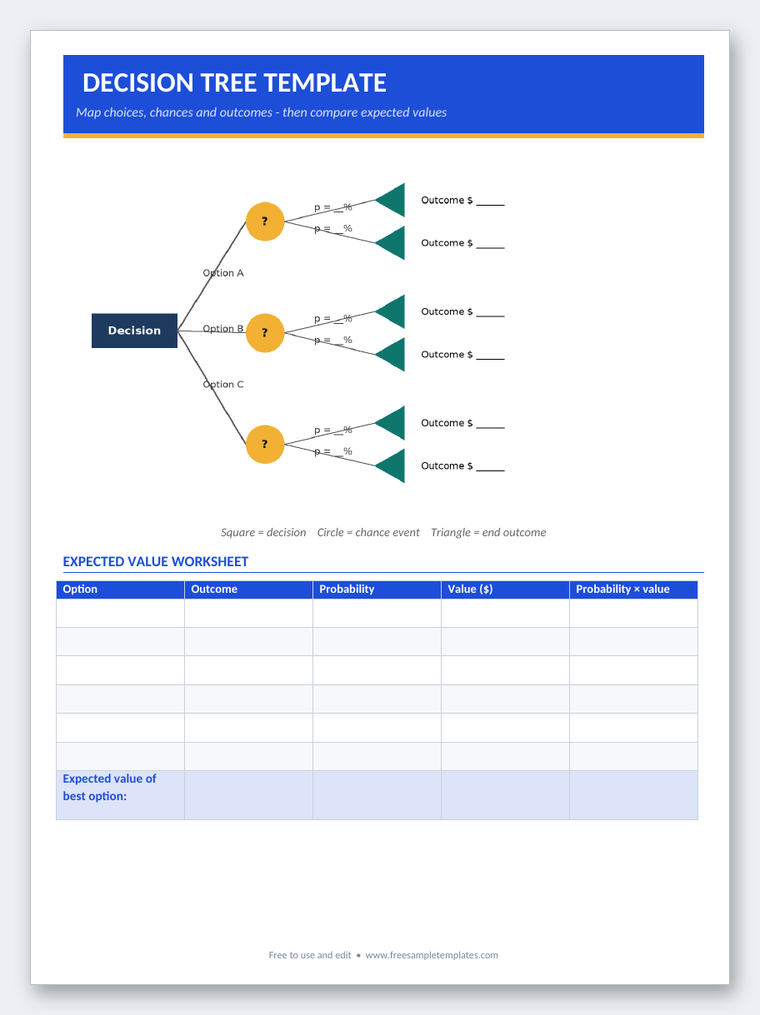
In a conventional decision-analysis diagram, decision nodes are often shown as squares and chance nodes as circles. Endpoints show the outcome being evaluated. If the template uses another convention, include a legend and keep it consistent.
A decision branch represents an alternative the decision maker can choose. A chance branch represents a possible event outside that immediate choice, such as high or low demand. Do not give an uncertain event the appearance of a choice you can simply select.
For a chance node, the modeled outcomes should be mutually exclusive and collectively cover the situation represented. Their probabilities should sum to one. If relevant outcomes are missing, the resulting calculation may not describe the decision adequately.
Probabilities need a basis. They might come from suitable records, a carefully justified estimate, or an explicitly stated scenario assumption. Do not invent precise-looking probabilities and present them as established facts.
MIT’s OpenCourseWare decision-analysis material explains the use of decision trees to represent choices under uncertainty. A diagram is a model of the decision, and its usefulness depends on the structure and input information.
An expected-value example
Suppose a fictional delivery plan has two modeled net outcomes: a benefit of 600 currency units if demand is high, with an assumed probability of 0.4, and a loss of 100 if demand is low, with an assumed probability of 0.6. The probabilities sum to one.
The expected net value is 0.4 multiplied by 600 plus 0.6 multiplied by negative 100, which equals 180. A separate alternative with a certain net value of 150 would have a lower value under this particular expected-value comparison.
That does not mean the first plan will produce 180 in a single instance. Its modeled outcomes are 600 or negative 100. Expected value is a probability-weighted measure, not a guaranteed payment or forecast of the exact result.
The decision may also depend on whether the organization can tolerate the loss, whether the assumptions are credible, and whether other important outcomes have been omitted. Do not use a simple numerical comparison as a substitute for appropriate judgment.
Use a cost analysis spreadsheet template to organize relevant cost assumptions where helpful. Keep the amounts consistent with the tree and avoid subtracting a cost twice if the endpoint values are already net of that cost.
Review assumptions and sensitivity
Change an uncertain input and see whether the preferred option changes. In the example, a lower probability of high demand could reduce the expected value of the first plan. If a small change reverses the result, the decision is sensitive to that assumption.
Document the input’s source and any important limitation. An estimate based on a different period or market may not fit the current decision. Make the uncertainty visible rather than hiding it behind a polished diagram.
Consider whether additional information would be useful before choosing. A tree can help identify where uncertainty matters, but collecting information also has a cost and may not resolve the issue completely.
For high-stakes medical, financial, legal, or safety decisions, a generic tree is not a professional assessment. Use the relevant expertise and approved process. A visually simple branch must not make a complex eligibility or risk judgment appear settled.
Customize the template and keep it readable
Start with a small number of levels. Add branches only when they explain a meaningful difference. If several branches lead to the same action, consider whether the structure can be simplified without losing important reasoning.
Use short labels and place longer assumptions in notes or a supporting table. Crossing lines and crowded text make the tree harder to follow. Check the diagram at the size readers will actually see in print or on a presentation screen.
Use a legend when symbols or colors carry meaning. Keep essential information in text as well so the diagram remains understandable in black and white and to readers who do not distinguish the colors.
Confirm whether the resource is an editable diagram, presentation file, image, or instructional page. Do not claim that a static preview includes formulas, interactive controls, or a working analysis engine.
From the tree to an action
Once a decision is made, record the option selected, the reasons, and the assumptions that mattered. A action plan template can help assign the next steps and review points. Keep the tree as the reasoning record rather than expecting it to manage implementation.
If the problem is understanding possible causes of an existing issue, a fishbone diagram template may be more appropriate. A fishbone diagram organizes potential causes; a decision tree organizes branches of a decision or process. Choose the method that answers the question you actually have.
Review the tree when the process, options, or information changes. An old routing rule can direct people incorrectly, and an outdated probability can distort a comparison. The template’s value comes from a clear, current model, not from the appearance of certainty.
Get Free Decision Tree Templates
Decision tree questions
Does a decision tree show every possible outcome?
No. It shows the outcomes included in the model. Review whether important alternatives or events are missing and state the model’s boundaries.
Do I need probabilities for a yes-or-no routing tree?
Not usually. A routing tree can direct actions based on answers. Probabilities are relevant when analyzing uncertain events and outcomes, not required for every branching diagram.
Does expected value predict the exact result?
No. It is a probability-weighted measure of modeled outcomes. A single result may be very different, and risk tolerance or other considerations can affect the decision.
Must chance probabilities add up to one?
For the complete set of modeled outcomes at a chance node, yes. The outcomes should not overlap and should cover the situation represented.
Can a presentation template train a machine-learning model?
No. A visual template is not a trained predictive system. Machine-learning trees require data, training, evaluation, and appropriate implementation.
When should I choose a fishbone diagram instead?
Use it when you want to organize possible causes of a problem. Use a decision tree when the main task is showing choices, conditional routes, or uncertain outcomes.


