
An awards event program template gives guests a readable sequence of the ceremony, award categories and confirmed recipient information. Keep the public program concise and maintain backstage cues in a separate working schedule. Check names, titles and timing before preparing the final print or digital version.
Coordinate guests with printable invitations, review recognition wording using certificate samples and record arrivals on a sign-in sheet where needed. Use the same approved event details across each document so invitation times, program order and attendance records agree.
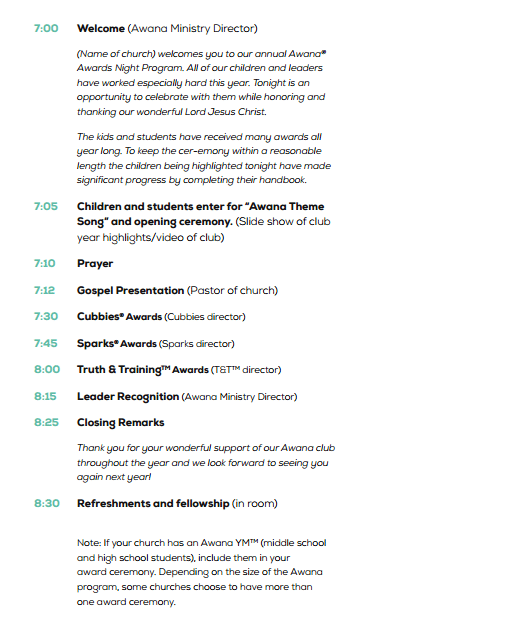
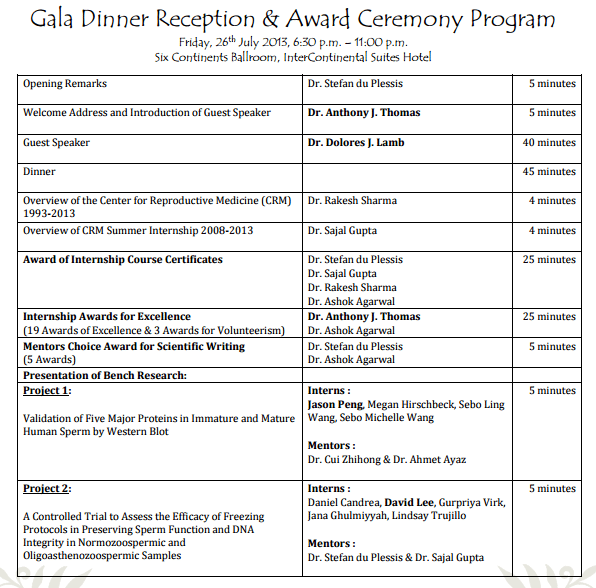
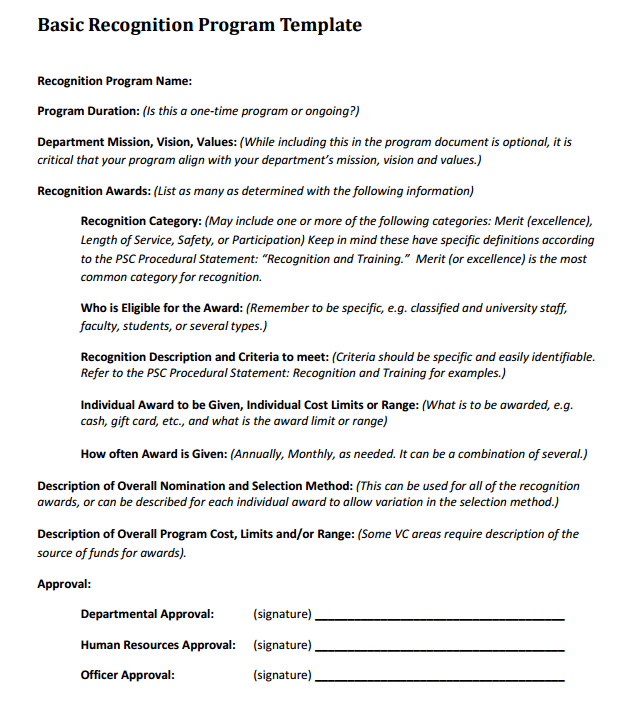
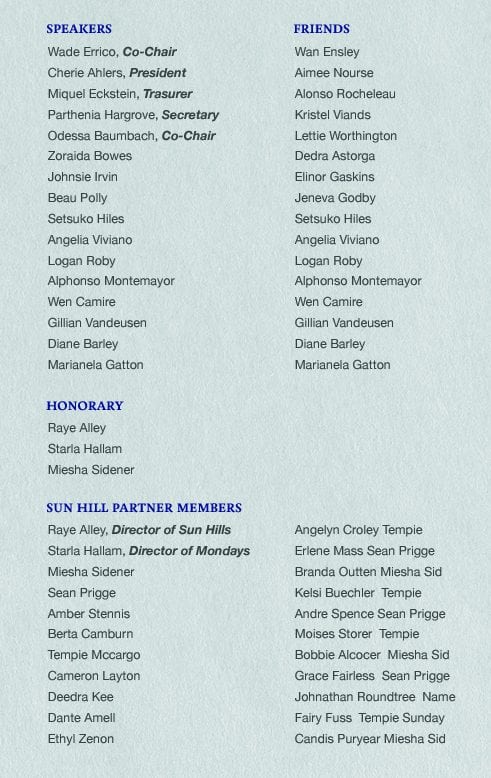
The four previews below include one external PDF resource link and three unlinked resource graphics. The linked filename identifies a dinner-program PDF. This is a collection of program examples rather than four confirmed editable downloads. Compare the previews for layout ideas and inspect any selected resource before assuming you can edit its text.
Begin with the confirmed ceremony details and the audience you are writing for. A school recognition event, employee awards dinner and community ceremony may need different descriptions, but all benefit from accurate names and a readable sequence. The following guide explains the basic contents and adds practical examples for timing, recipient checks, program versions and printing.
What Is an Awards Event Program?
An awards event program is a printed or digital document that provides attendees with information about an award ceremony. It may include the event schedule, opening remarks, award categories, names of recipients, presenters, entertainment, speeches, and closing activities.
A well-organized award ceremony program template makes the event easier to follow while giving the ceremony a more professional appearance. It can also become a keepsake for award recipients and guests.
Awards ceremonies are commonly organized by businesses, schools, colleges, universities, professional organizations, clubs, nonprofits, and community groups. Employee recognition events, academic award ceremonies, sports awards, achievement celebrations, and annual recognition programs can all benefit from a professionally designed event program.
Free Awards Ceremony Program Template
These free awards ceremony program templates provide a useful foundation for organizing your event information. Use an appropriate editable document, where available, or build your own layout based on the ceremony and number of awards.
A corporate awards program might include employee recognition categories, company achievements, keynote speeches, and presentation times. A school awards program could include academic achievements, sports awards, certificates, special recognition, and closing remarks.
What to Include in an Award Ceremony Program
A professional awards program template should clearly present the most important information about the event. This may include the ceremony title, date, time, venue, welcome message, event schedule, award categories, recipient names, presenters, speeches, entertainment, and closing remarks.
The program should be easy to read so guests can quickly find the next activity. Using clear headings and a logical sequence can make the document more useful throughout the ceremony.
Awards Event Program for Business and School Events
An employee awards ceremony program can be used to recognize outstanding employees, teams, managers, or departments. It can include awards for performance, leadership, innovation, customer service, attendance, or other achievements.
Similarly, a school awards ceremony program can recognize students for academic performance, sports, leadership, attendance, creativity, community service, and other accomplishments.
You can also adapt these templates for nonprofit recognition events, graduation celebrations, annual dinners, professional award ceremonies, and community achievement programs.
Editable and Printable Awards Program
An editable awards event program template allows you to replace sample information with your own event details and create a program that matches your ceremony. You can add organization branding, logos, recipient names, award descriptions, and the complete event schedule.
A printable awards ceremony program can be distributed to guests when they arrive at the venue. You can also save a completed digital version for email invitations, event websites, or electronic distribution.
The previews can provide layout ideas, while the availability of an editable file depends on the selected resource.
Separate the guest program from the working schedule
A guest program explains what attendees will see. It may list welcome remarks, award categories, speakers and closing activities. A working schedule tells staff when to prepare an item, cue a presenter, move a microphone or bring the next award into position. Those operational instructions are usually unnecessary in the guest copy.
Label the two documents clearly and give them matching version dates. If a presentation moves to another point in the event, update the working schedule and check whether the public sequence also needs to change. A printed program may become difficult to correct after distribution, so review the order before the final printing decision.
A daily schedule can help organize the preparation period, including setup, checks and guest arrival. Keep that timetable distinct from the ceremony sequence. Guests generally need the event’s start and flow, while the organizing team needs to know what must happen beforehand.
A fictional forty-five-minute ceremony outline
For a small fictional community recognition event, the organizers allocate five minutes to the welcome, five to an opening address, twenty to award presentations, five to a group acknowledgement and ten to closing thanks and next steps. The planned segments total forty-five minutes.
That outline is an illustration rather than a recommended duration for every ceremony. If there are ten awards within the twenty-minute presentation segment, the average allocation is two minutes per award. The team must decide whether that includes the citation, movement to and from the presentation point and any photograph.
The guest program could list the activities in order without publishing a minute-by-minute promise. The working schedule can hold detailed timing and responsible people. If an activity regularly takes longer in rehearsal, revise the plan instead of hoping it will fit because the printed page looks orderly.
Confirm award names and recipient details
Create one approved list of award categories and recipient names for the program, presenter notes and related recognition materials. Check spelling, capitalization and preferred display names through the appropriate source. Two slightly different versions of the same recipient’s name can create avoidable confusion during printing and presentation.
Confirm whether recipients will be named in advance or announced at the event. If the event keeps winners undisclosed until presentation, the guest program should not reveal them accidentally. Make that decision explicit before giving the text to the person preparing the layout.
For reference-only planning, a guest list can help the team manage expected attendance. It serves a different purpose from a public list of award recipients. Do not publish attendee contact details or internal attendance notes in the program simply because they appear in the organizing records.
Write short award descriptions
An award description should tell the guest what is being recognized. For example, Community Project Support Award could have a short description explaining the contribution or agreed selection basis. Keep the wording aligned with the organization’s actual award process rather than inventing eligibility rules while editing the program.
Avoid a long biography under every category unless the event needs that detail and the information has been confirmed. A short description may be enough for the public document, while the presenter receives a separate citation. This keeps the program readable and leaves the spoken presentation room to recognize the recipient.
If the award recognizes a team, check how members and contributors will be identified. A team name may be appropriate, while another event may list individuals. Agree that approach with the organizers before designing the page so names are not omitted merely because the text box is too small.
Prepare a welcome and closing that fit the occasion
A fictional welcome could read Welcome to the Example Community Recognition Evening. Thank you for joining us to recognize the work of our volunteers and project teams. The program below outlines the presentations and closing acknowledgements. That short note tells the guest why the event is taking place without repeating every award description.
The closing can identify a confirmed next activity, such as a gathering in the foyer, or simply thank guests for attending. Do not print an unconfirmed reception arrangement or venue instruction. The organizing team should verify where guests are expected to go and whether the relevant staff and space are ready.
A letter of appreciation can provide a separate, personal thank-you to contributors after the ceremony. The program acknowledgement and the individual letter have different roles. A public line might recognize a group, while a letter can explain a particular person’s contribution in more detail.
Give reviewers distinct questions to answer
Ask the event lead to check the activity sequence, the award owner to check categories and recipients, and the relevant coordinator to check venue and contact information. Those roles may belong to one person at a small event, but the questions remain different. General approval without reviewing specific facts can miss a wrong name or location.
Keep uncertain information visibly marked in the draft. A presenter name awaiting confirmation should not look final merely because it has been placed in the layout. Use an internal note during preparation and remove it only when the detail is resolved or deliberately omitted from the public version.
Set a point when the text is ready for printing and record the approved version. If a late change arrives, assess which documents are affected: guest program, working schedule, presenter notes or all three. Avoid changing only the easiest file and leaving the people delivering the ceremony with an older sequence.
Check layout and printing as a separate step
Review the program at the size guests will actually receive. Award names and recipient names should be legible, and the order should be easy to follow. A long line that fits on a large screen may become crowded in a folded printed program.
If the design is folded, check page order using a test copy before producing the full quantity. Review the front, inside and back as a reader would use them. Confirm that a heading is not stranded on one page while its award list appears on another, and that decorative elements do not obscure text.
For a digital copy, export a version that preserves readable text and a sensible sequence. Inspect the result rather than assuming it matches the editing view. Keep a clear filename and version date so the link or email does not distribute a superseded draft.
Handle event-day changes clearly
Sometimes a presenter or sequence changes after programs have been printed. Decide how the host will communicate the revision and update the working schedule used by staff. The audience needs a clear announcement, while the team needs accurate instructions for the next presentation.
Keep the program within its role. It should help guests understand the ceremony and preserve accurate information about the recognition. Reliable names, a confirmed sequence and readable presentation are more useful than a lengthy document that contains operational details the audience does not need.
Below Are Awards Event Program Templates

Awards event program template FAQs
Are four editable downloads available?
The page has four previews, but only one resource graphic is linked, to an external PDF destination. Three graphics are unlinked. Inspect the selected resource for its actual format and use the previews as layout references rather than assuming each has an editable file.
Should guests receive the backstage timing sheet?
Usually they need the public activity sequence rather than staff cues and contingency notes. Keep a separate working schedule for operational details and label the versions clearly. Review both documents when the sequence changes.
Must the program reveal award recipients?
That depends on the event’s announcement plan. Confirm whether winners are named in advance or kept undisclosed until presentation. Check the program against that decision before printing so a draft does not reveal a result unintentionally.
How do I estimate time for many awards?
Allocate time for the complete presentation activity, including any citation, movement and photograph. A fictional twenty-minute segment for ten awards averages two minutes per award, but the actual plan should be checked against the ceremony’s requirements and rehearsal.
What if the ceremony changes after printing?
Update the working instructions and agree how the host will announce the change to guests. Keep staff on the same revised sequence. A clear announcement can explain a change without pretending the printed program still reflects every event-day detail.
