
An Excel inventory template organizes item codes, quantities and dated stock movements. Decide whether you need a stock list, movement register or count comparison, then use consistent units. Check the physical count and transaction sources rather than assuming a spreadsheet automatically reflects shelf quantities.
Use price list templates for customer prices, sales logs for recorded sales and a checklist for stock-count preparation. Prices, sales quantities and counted inventory should have their own labels and references so they can be reconciled without confusion.
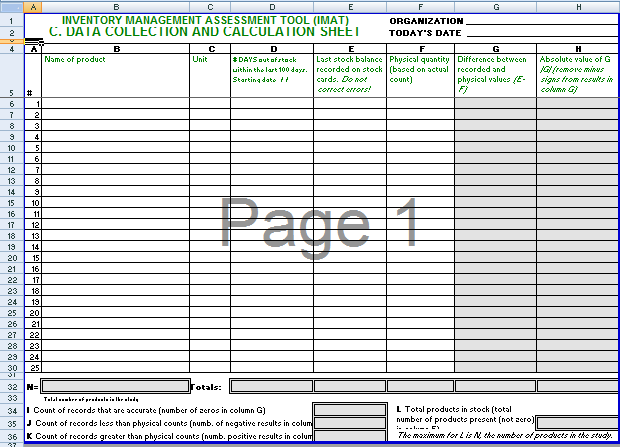
This page currently contains one inventory preview and one local ZIP resource link. Earlier text described six Excel templates, but that does not match the visible collection. The ZIP filename identifies an IMAT tool resource without revealing its enclosed file format or functions. Inspect the actual contents before assuming it is an Excel workbook with stock formulas.
Use the guidance below to decide what information an inventory record should hold and how changes will be maintained. The examples are fictional operational calculations, not an accounting valuation method. A small, accurate record with clear item and unit definitions is more useful than a complex sheet whose figures are not updated.
What Is an Excel Inventory Template?
An Excel inventory template is a spreadsheet designed to record and manage inventory information. Depending on the template, it may track current stock, incoming purchases, outgoing sales, reorder levels, inventory value, or product details.
A stock inventory template is particularly useful for businesses that need a simple way to monitor products without investing in specialized inventory management software. Excel also makes it possible to sort, filter, calculate, and update inventory information as stock changes.
Free Inventory Spreadsheet for Small Business
A small business inventory template can help owners maintain better control over products and supplies. A simple spreadsheet can record item names, SKU or product numbers, quantities available, purchase prices, selling prices, and reorder information.
For businesses with a relatively manageable number of products, an Excel inventory spreadsheet can provide an inexpensive and flexible way to maintain stock records.
Inventory Tracking Template
An inventory tracking template can be used to monitor changes in stock over time. You can record purchases, sales, returns, adjustments, damaged goods, and other inventory movements.
Keeping these transactions updated helps create a clearer picture of current inventory. It can also make it easier to identify discrepancies between recorded stock and physical inventory.
Warehouse Inventory Template
A warehouse inventory template can help organize information about products stored in different locations. Depending on the business, the spreadsheet can include item numbers, descriptions, quantities, storage locations, suppliers, and reorder information.
For larger warehouses with complex inventory requirements, specialized inventory management systems may be more appropriate, but an Excel spreadsheet can still be useful for smaller operations or simple inventory lists.
Inventory List Template in Excel
An inventory list template provides a straightforward way to create a searchable list of products or materials. Excel allows users to sort and filter records by product name, category, supplier, quantity, or other columns.
This can be useful for office supplies, retail products, tools, equipment, raw materials, spare parts, and other items that need regular monitoring.
Inventory Management with Excel
Excel can support basic inventory management by combining organized data with formulas and filtering. Depending on the template, you can calculate totals, track stock changes, estimate inventory value, and identify products approaching their reorder level.
The most important part of maintaining an inventory spreadsheet is keeping the information current. A well-designed template will only be useful if purchases, sales, adjustments, and physical stock counts are entered accurately.
The visible preview supplies one layout reference. Check the linked archive’s actual contents before selecting a working inventory format.
Choose an item identifier and unit
Give each item a consistent identifier and a clear description. Similar products may differ in size, compatibility or pack quantity, so a name such as cable may not be enough. Use the organization’s established item code where one exists rather than creating a competing code for the worksheet.
Define the unit used for the quantity. Six boxes and six individual pieces can represent very different amounts. If purchases arrive in packs but stock is issued as individual units, record the relationship explicitly so the movement calculations use one consistent basis.
For example, a fictional item bought in packs of ten might be recorded in individual units. A receipt of two full packs would then add twenty units to that stock record. Do not enter two into a units column and assume the worksheet will infer the pack size.
Separate item details from movement events
An item list describes the products being tracked. A movement record describes receipts, issues, returns or other changes. Mixing permanent item details with several unlabeled quantity changes on one row can make it difficult to reconstruct why the current total changed.
For each movement, record the date, item reference, quantity, direction and supporting reference. Include the relevant location when stock moves between places. A transfer out of one location and into another should be understandable as a transfer, rather than two unrelated events.
A packing list can describe items physically included in a shipment. Use it as one supporting record where the process requires, while recognizing that preparing a packing list is not proof that stock has actually left. Apply the movement at the stage defined by the organization’s procedure.
A fictional stock-movement example
Assume the record opens with forty units of one item. A confirmed receipt adds twenty and an authorized issue removes fifteen. The expected recorded balance is forty-five: forty plus twenty minus fifteen. Each change should have a date and reference so someone can reproduce that total.
If a physical count later finds forty-three units, the difference from the recorded balance is minus two. That difference is an observation to investigate. It should not immediately be labeled theft, damage or a counting error without checking the relevant records and count.
Record the count date, location, item and unit, then examine the difference through the organization’s process. If an adjustment is approved, retain its reason and reference. Simply replacing forty-five with forty-three hides the difference and makes the history harder to understand.
Distinguish stock held from stock available
A record of quantities physically held does not always show what can be issued immediately. Some items may be reserved, awaiting review or in another location. Define any status fields so the person reading the sheet understands how the organization uses them.
Do not add or subtract a reserved quantity twice. If reservations are tracked separately from physical movements, document how the available figure is calculated. Inspect any workbook formulas before using them, and confirm that they reflect the intended meaning of each column.
The template’s filename does not establish reservation logic, reorder warnings or automatic updates. A blank cell or colored row is not a substitute for the actual procedure. State which quantities are manually maintained and which calculations, if any, are supported by the chosen file.
Connect replenishment with the approval process
A low recorded quantity can prompt a review, but it does not necessarily authorize a purchase. Check physical availability, upcoming needs and the organization’s replenishment rules. The appropriate order quantity may depend on matters beyond one visible spreadsheet balance.
A requisition form can communicate an internal request for the resource and the reason it is needed. Include the relevant item reference and verified quantity information where useful. The requisition records a request and review; it does not independently establish a supplier commitment.
A purchase order can document the resulting order where the organization’s process uses one. Keep ordered, received and recorded-in-stock quantities distinct. A purchase order for twenty units should not automatically add twenty to physical stock before receipt is confirmed.
Keep shared records consistent
Decide who updates the working inventory record and when movements are entered. If several people keep independent copies, totals can diverge even when each file looks organized. Label the current working version and avoid treating an old emailed copy as a live stock balance.
When sorting a spreadsheet, keep all fields belonging to an item or movement together. A description separated from its quantity or location becomes misleading. Review formulas and references when adding rows so a total does not omit newly entered records.
Use a clear process for correcting entry mistakes. Identify the affected reference and explain the correction rather than erasing the history without context. The appropriate approach depends on the chosen system, but the record should remain understandable to the next person reviewing it.
Review counts and the worksheet’s purpose
Plan physical checks according to the organization’s needs and process. A count needs a clear date, location and unit basis so it can be compared with the relevant recorded position. Unrecorded movements during the comparison period can make an unexplained difference harder to interpret.
Keep operational quantity tracking distinct from financial reporting. A simple quantity multiplied by a price can demonstrate arithmetic, but it does not establish the correct accounting value of inventory. Use the organization’s appropriate accounting method and review for any reporting purpose.
Before using the resource, inspect its actual contents, remove irrelevant sample data and decide which recordkeeping job it will perform. Confirm that the layout, formulas and status labels match that job. Accurate item definitions and traceable movements provide the foundation; the file format alone does not supply them.
Get Excel Inventory Templates Below
Excel Inventory Management Sample

Excel inventory template FAQs
Does the page contain six Excel downloads?
The visible collection currently has one preview and one ZIP resource link. The link does not reveal the enclosed file format or features. Inspect the archive instead of assuming it contains six workbooks or a particular automatic tracking system.
Why does the quantity unit matter?
Boxes, packs and individual pieces represent different quantities. Define the unit and any relevant pack conversion so receipts and issues are recorded consistently. A numeric total is difficult to interpret when the underlying unit changes between entries.
How should I handle a count difference?
Record the actual count and its date, location and unit, then investigate it against the movement records. Keep any approved adjustment traceable. Do not immediately assign a cause or silently replace the recorded figure.
Is ordered stock the same as received stock?
No. An order describes the quantity requested from a supplier; receipt records what actually arrived. Keep their statuses and references clear so an outstanding order is not treated as stock already on hand.
Can an inventory quantity calculation establish accounting value?
Not by itself. Operational stock tracking and financial valuation serve different purposes. Use the appropriate accounting method and review for reporting requirements rather than assuming a sample quantity-and-price formula settles them.
