
A fax cover sheet identifies the sender, intended recipient, subject and expected pages in a fax packet. Confirm the destination before sending and state whether the page count includes the cover. Keep the subject concise and avoid putting unnecessary sensitive detail on the first page.
Use approved company letterhead for enclosed correspondence, organize long packets with a table of contents and confirm routing against a contact list. A cover notice supports handling but does not independently make transmission secure or verify delivery.
The previews below show sample layouts; use the download button under each preview that offers a file. The collection includes different layouts and resource providers, so check the actual destination for its file format, editing requirements, and terms. A picture of a form does not establish that every resource is an editable Word file or that a template supplies a fax service.
Use the cover sheet to make the transmission understandable. It does not encrypt the attached documents, verify that the recipient was authorized to receive them, or prove that someone read them. Those questions depend on the transmission method and the organization’s handling process.
Free Fax Cover Sheet (Word Template)
Download this ready-to-use, fully editable fax cover sheet in Microsoft Word (.docx) format. Fill in the fields, adjust the layout to your needs, then print or save it.
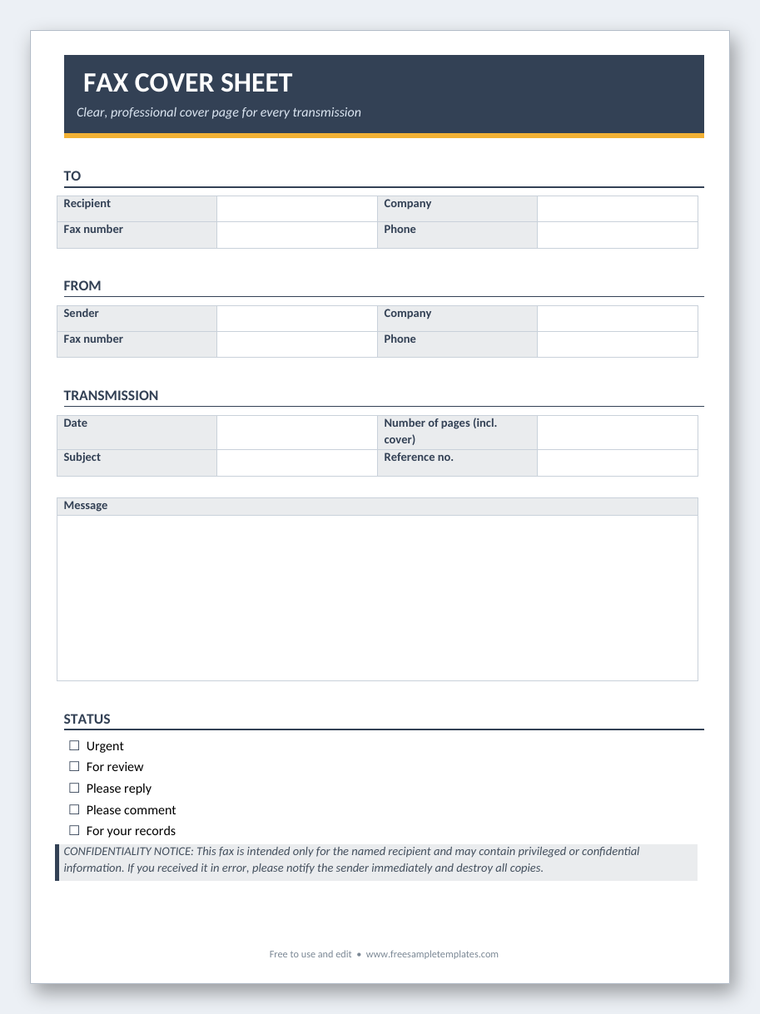

What the cover page should tell the recipient
Include the recipient’s name or department and organization, the destination fax number, the sender’s name or role, and an appropriate callback number. The destination number is particularly important to verify; a correctly addressed page sent to the wrong number is still misdirected.
State the date and a concise subject or reference. Choose wording that helps routing without unnecessarily exposing sensitive information. “Documents for request 214” may be more appropriate than describing private details on a cover page that several people can see.
Show the expected page count and explain whether it includes the cover sheet. “Four pages including cover” is unambiguous. If there are three attached document pages and one cover, the total under that convention is four.
Use a short note for the purpose or requested action. The recipient should be able to tell whether the packet is for review, filing, signature, or another defined step. Do not make an important request depend only on a checked box whose meaning is unclear.
Confirm the destination before sending
Use a current, trusted contact record or confirm the number through an appropriate channel. Do not rely solely on a number copied from an old template or a previous recipient’s cover sheet.
A contact information template can help organize a verified business contact record where appropriate. Keep the fax number clearly labeled so it is not confused with a telephone number. Review the record when the recipient’s arrangements change.
Check whether the intended department still uses that destination and whether it can receive the material through your proposed method. Some organizations have a specific submission route or reference requirement. Follow those instructions rather than assuming any published number is suitable.
For sensitive material, use the organization’s approved transmission and access process. Confirming a number is a practical safeguard, but it does not settle every privacy or authorization requirement.
A fictional cover-sheet example
For an ordinary business packet, the fields might read:
“To: Purchasing Department, Cedar Office Supplies Fax: Verified destination number From: Alex Reed, Northfield Workshop Date: 12 October 2026 Subject: Purchase-order clarification, reference PO-214 Pages: Four including this cover Message: Please review the three attached pages and contact me using the callback details if any page is missing.”
The example makes the intended department, purpose, and page count clear. Replace the placeholder number with the verified actual destination; do not invent a plausible number and risk sending documents to an unrelated recipient.
If the packet concerns an order, the purchase order template can help organize the underlying transaction document. Keep the cover reference consistent with that document. The cover page routes the packet; it does not change the order’s terms.
For a signature request, identify the actual document and the appropriate return process. Do not describe the fax as an approval already given when you are merely asking the recipient to review it.
Prepare the complete packet
Gather the intended pages in the correct order and remove unrelated material. Check that the cover identifies the same recipient and subject as the attached documents. Template reuse can leave a previous recipient’s details on the first page.
Make sure the documents are legible at their transmitted size. Faint handwriting, very small text, or a crowded table may be difficult to read after transmission. Use a clear version appropriate to the receiving process.
Check both sides of physical sheets if your method scans only one side. For a digital fax process, confirm the supported document format and review the upload or preview through the provider’s normal process. Do not assume that every service handles pages or attachments identically.
Count the pages after assembling the packet, not before removing or adding material. If the page count changes, update the cover. A count that matches an earlier draft can make the recipient think pages are missing.
A pre-send review
- Confirm the recipient and verified destination number.
- Check the document versions and page order.
- Count all pages using the stated convention.
- Review the subject, callback details and requested action.
- Confirm the appropriate handling process for the material.
Keep the review proportionate to the documents. An ordinary administrative packet and a sensitive record may need different controls, but both benefit from accurate destination and page details.
If you are unsure whether the material should be sent by fax, check the recipient’s instructions and your organization’s process. A cover-sheet template is not a reason to choose fax over an approved alternative.
Confidentiality wording has limits
Some cover sheets contain a confidentiality notice or instructions for a misdirected recipient. Use wording approved for your organization and situation. Do not assume that a long notice makes the transmission secure or establishes compliance.
Avoid putting the sensitive information itself into the notice or subject. A cover sheet can be visible before the attached pages are reviewed. Identify the packet with the minimum useful routing detail.
For United States healthcare disclosures, HHS guidance describes the need for appropriate safeguards, including confirming a fax number and protecting access to the receiving equipment in relevant circumstances. A generic cover sheet is only one possible part of a handling process, not a standalone compliance solution.
For legal, financial, or other sensitive material, use the applicable authorized process. If a fax is sent to the wrong destination, follow the organization’s incident procedure promptly rather than assuming the printed disclaimer resolves the problem.
Send and check the outcome
Enter the verified destination using the method’s normal controls. Check it again before initiating the transmission. Do not let an autofilled or saved number bypass the review when the recipient has changed.
Review any transmission result the equipment or service provides. A result may indicate a technical status, but it does not necessarily establish that the intended person received, read, or approved the documents.
If the recipient needs to confirm receipt, ask through the appropriate channel and identify the packet reference. A phone message template can help record a callback or confirmation request in an ordinary office workflow.
If only part of the packet arrived, determine what is missing before resending. Identify a replacement transmission clearly so the recipient can avoid combining inconsistent versions. Update the page count and note the purpose of the resend.
Customize the preview that fits your process
Choose a layout with enough room for sender, recipient, reference, page count, and a brief message. A compact personal cover may be suitable for a short non-sensitive packet; a business layout may provide more structured routing fields.
Replace all sample names, numbers, dates, and contact details. Do not leave a preprinted recipient number in the document because it looks like part of the design. Check text boxes, headers, and repeated details.
Use a readable font and keep the main fields easy to distinguish. A decorative background should not obscure the destination or page count. Check the final print or exported file rather than relying only on the editor view.
If the resource is an image, it may be a printable example rather than a fully editable document. Confirm the actual file and available editing method. The gallery links lead to different providers, so their availability and formats may differ.
Retain the right record
Keep the final cover, relevant document version, and transmission information under the organization’s process when needed. Those records can help trace what was sent and where, but they should not be described as proof of a separate approval.
Store sensitive copies appropriately and avoid leaving printed pages at shared equipment. Decide who needs the record and how it should be retained. A digital copy can be convenient but creates another place where information must be protected.
A useful fax cover sheet makes a packet easier to route and check. Its effectiveness comes from accurate details, legible pages, and a reliable handling process, not from a promise that the template makes every transmission secure.
Below Are Fax Cover Sheet Templates
Fax cover sheet questions
Should the page count include the cover?
Use a clear convention and state it. For example, three attached pages plus the cover can be labeled “four pages including cover.”
Does a cover sheet make a fax secure?
No. It provides identification and routing information. Security and privacy depend on the transmission method, authorization, access, and handling process.
Is a successful transmission result proof of approval?
No. A technical transmission result does not establish that the intended person read or accepted the documents. Use the appropriate confirmation or approval process.
What should the subject line contain?
A concise purpose or reference that helps routing. Avoid unnecessary sensitive detail on a page that may be visible at shared equipment.
What if the recipient reports missing pages?
Identify the missing material and resend through the appropriate process. Clearly label the replacement packet and update the page count.
Are the five resources all Word files?
The page does not establish that. They link to different external providers, so check each actual resource’s format and editing requirements.

