
A quotation template helps a customer compare proposed products or services using clear quantities, pricing units, inclusions and conditions. Identify the version and validity period, separate optional items and check spreadsheet calculations before sending. The accepted quote should remain traceable when scope or pricing changes.
Use a price list for standard rates, a cost analysis spreadsheet to review the assumptions behind an estimate and a contractor invoice when approved work is billed. Keep internal costing separate from customer-facing prices and reference the accepted quote version.
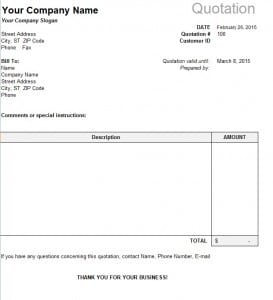
The resource below is one quotation preview with an XLSX spreadsheet destination. It is a starting point for a price-quote layout rather than a collection of Word forms. Review its actual fields and formulas before entering live pricing, and make sure the customer-facing copy shows the intended values rather than old example amounts.
Use the quotation for the offer and scope. A buyer’s purchase order may reference an accepted quote, while a service order can carry confirmed customer requirements into fulfillment. Those connected records should identify the same accepted version so a pricing revision does not get lost between sales and delivery.
What Is a Quotation?
A quotation, also called a price quotation, sales quotation, or business quote, presents pricing for specified products or services. Distinguish a preliminary estimate from a definite offer and describe the intended scope and conditions. It normally identifies the seller and customer, describes the products or services, and provides pricing information.
A quotation can be particularly useful for contractors, suppliers, consultants, agencies, freelancers, manufacturers, retailers, and other businesses that prepare customized prices for customers.
A professional quotation should be easy to read and should clearly distinguish the individual items, quantities, unit prices, discounts, taxes, and final estimated total.
What Should a Quotation Template Include?
A useful quotation form generally includes the business name and contact details, quotation number, date, customer information, product or service descriptions, quantities, unit prices, subtotal, taxes, discounts, total amount, validity period, payment terms, delivery information, and relevant terms and conditions.
The exact information depends on the type of business. A contractor may need sections for labor and materials, while a supplier may need product codes, quantities, delivery dates, and shipping charges. A freelancer may focus more on project scope, milestones, hourly rates, and payment schedules.
Free Quotation Template for Business
A business quotation template can help companies prepare consistent price quotes for customers and clients. Using a standardized format makes it easier to compare quotations, maintain records, and present pricing professionally.
An editable quotation template can also be customized with your logo, brand information, payment instructions, terms and conditions, and other business-specific details. This makes the document suitable for repeated use while maintaining a consistent professional appearance.
Quotation Template for Services and Products
A quotation can be used for both products and services. A product quotation may list individual items, quantities, unit prices, discounts, and delivery costs. A service quotation template can describe the scope of work, estimated hours, service fees, project stages, and additional charges.
For complex projects, clearly describing what is included in the quoted price is particularly important. It can help prevent misunderstandings about the scope of work and additional costs.
Quotation vs. Invoice
A quotation and an invoice serve different purposes. A quotation generally presents proposed pricing before a customer accepts an offer, while an invoice is normally issued to request payment for products or services that have been provided or formally billed.
A business may therefore use both documents as part of its sales process: quotation first, followed by an invoice after the customer accepts the offer and the transaction moves forward.
How to Create a Professional Quotation
Start by entering your company name, contact information, quotation number, and date. Add the customer’s name and contact details, then describe the products or services being offered.
Enter quantities, rates, discounts, taxes, and the total amount accurately. Add payment terms, quotation validity, delivery information, and any important conditions. Before sending the document, check all calculations and make sure the scope of the offer is clear.
A professional printable quotation template can be particularly useful for small businesses that want a simple and consistent way to provide customers with written price estimates.
Note: A quotation is generally an offer or estimate rather than an invoice. The legal effect of a quotation can vary depending on its wording, acceptance, transaction, and applicable law.
Worked example: quote quantities and optional services
Consider a fictional supplier offering 12 display trays at 15 per tray. The item subtotal is 180. A separately stated delivery charge of 20 makes a subtotal of 200 before any applicable taxes or other expressly agreed charges. Name the currency and the quantity unit beside these figures. “12 trays” is more precise than a line saying “12 items” when different product sizes are available.
The customer also asks about installation. Show that as a separate option with its own scope and price, rather than quietly adding it to the main total. If the base offer excludes installation, say so plainly. A customer comparing two quotes needs to know whether both contain the same services; comparing totals alone can hide a meaningful difference in the offer.
For a service quote, describe the result to be delivered and the assumed workload. An illustration might specify two design concepts and one revision round, with printing excluded. That wording gives the customer a clearer choice than “design work.” If further revisions are priced separately, explain the agreed basis before work begins. Example quantities and amounts here are instructional, not recommended rates.
Use revisions that can be traced
Give the quote a unique number and identify revisions where the offer changes. If Q-125 revision 1 was sent with 12 trays and the customer later requests 15, prepare revision 2 with the changed quantity and total. Make the current version easy to identify and preserve the earlier version with its superseded status. Do not silently overwrite the copy already sent.
Record the quote’s issue and expiry dates separately from the requested delivery date. An expiry tells the reader how long the stated offer is intended to remain available; a delivery date describes a proposed fulfillment requirement. If the customer responds after expiry, review the actual prices, stock, and scheduling assumptions before confirming the offer rather than assuming the old information still applies.
Australian business.gov.au guidance includes an expiry date and a place for acceptance among the details to consider in a written quote. Local requirements and the effect of acceptance vary with the transaction and applicable law, so use terms suited to your own business. Calling every quotation a non-binding estimate can mislead a customer if the document is intended as a definite offer.
When the customer accepts, preserve the evidence of acceptance and the version it concerns through your actual business process. If there are conditions still to be confirmed, label them clearly. A checkbox on a blank template is not evidence that someone agreed, and a salesperson’s note that a customer is interested should not be recorded as final acceptance.
Check the spreadsheet and the customer copy
For each pricing row, check that the quantity, unit price, and line total refer to the same unit. A price per carton cannot be multiplied by a count of individual trays without conversion. If a discount applies, name the items or subtotal it applies to. Keep delivery and other charges visible so the customer can understand how the proposed total was formed.
Do not assume that an XLSX file contains the formulas your process needs or that its formulas are correct for your intended use. Review the actual workbook, ensure all required rows are included in totals, and inspect the resulting customer-facing document. A hidden row, stale sample value, or truncated description can undermine an otherwise clear quote. Use the business’s actual applicable tax treatment rather than the illustrative arithmetic above.
Once the accepted offer moves to billing, reference it from the service invoice where relevant and account for approved changes. Keep quotation and invoice numbers distinct. A later invoice can draw on the accepted scope, but it should not replace the historical offer or imply that the original quotation itself confirmed payment.
Record the assumptions that change the offer
Pricing assumptions should be concrete enough to review. If the amount assumes access during normal hours, a specified delivery location, a stated quantity, or customer-supplied artwork, record that fact in the quote. Avoid a broad note saying “subject to conditions” without identifying the conditions that affect the customer’s choice.
For an uncertain task, distinguish the preliminary estimate from a more defined quotation and explain what information is still needed. Staff can then arrange the review necessary to price the final scope. The useful question is whether the document accurately describes what the business is offering and what remains unresolved; the heading alone does not settle its legal effect.
Before sending, check the recipient, version, scope, units, dates, and contact route for questions. Keep the approved sent copy with its supporting pricing assumptions. That record lets another staff member explain the offer later without relying on memory or reconstructing an old total from a changed spreadsheet.
Download Quotation Template:

Frequently Asked Questions
What file format is linked on this page?
The existing resource destination names an XLSX spreadsheet. Review the actual workbook’s fields and formulas before using it for live quotations.
Is every quotation only a non-binding estimate?
No. The effect depends on the wording, acceptance, transaction, and applicable law. Distinguish a preliminary estimate from the offer you intend to make and use appropriate terms.
Where should optional services appear?
Separate them from the base scope with their own description and price. State what the base offer excludes so the customer can compare options accurately.
How should I revise a quote already sent?
Issue an identifiable revised version and preserve the earlier sent copy. Record the changed scope or pricing and make clear which version is current.
Is the expiry date the same as the delivery date?
No. Expiry concerns the intended availability of the offer; delivery concerns fulfillment. Keep both fields separate where both matter.
What if the customer accepts after expiry?
Review prices, stock, scheduling, and applicable terms through your actual process before confirming the offer. Do not assume the earlier assumptions still hold.
Should a quote number become the invoice number?
Keep the records identifiable for their different purposes. The invoice can reference the accepted quote without replacing the original offer.
What should I check in the price calculation?
Confirm quantities and pricing units, line totals, the scope of discounts, separate charges, and all rows included in the total. Apply your business’s actual applicable tax treatment.
