Cost analysis spreadsheet templates show how totals are built from quantities, rates and assumptions. Define the period and units, separate estimates from actuals and compare like-for-like scope. Review formulas and source amounts before using a calculated total for a decision.
Review results alongside a profit and loss statement, identify the billing basis in a service invoice and trace recorded transactions through a general journal worksheet. Internal costing, billed amounts and accounting entries serve different purposes and need clear references.
This page now includes two original downloads: Unit Cost Build Workbook and Budget Versus Actual Cost Workbook. Choose the Unit Cost Build Workbook for quantities multiplied by rates per output unit. Choose the Budget Versus Actual Cost Workbook for category-level differences and cost variance percentages.
The new files appear first with previews and clearly labeled download buttons. The original gallery and its resource examples follow the practical guide; descriptions of the older collection refer to that original gallery. The new Excel workbooks contain formulas and clearly marked fictional examples. Replace the input examples while retaining the formula cells.
Use the cost analysis for assumptions and comparison. A quotation supplies a particular supplier’s offer, while a expense report documents spending under an organization’s actual process. Keep proposed amounts separate from confirmed actual costs so the worksheet does not turn an estimate into a payment record.
Two new templates to download
Choose the Unit Cost Build Workbook for quantities multiplied by rates per output unit. Choose the Budget Versus Actual Cost Workbook for category-level differences and cost variance percentages.
Unit Cost Build Workbook
Calculate a product or service unit cost from quantity and rate inputs.
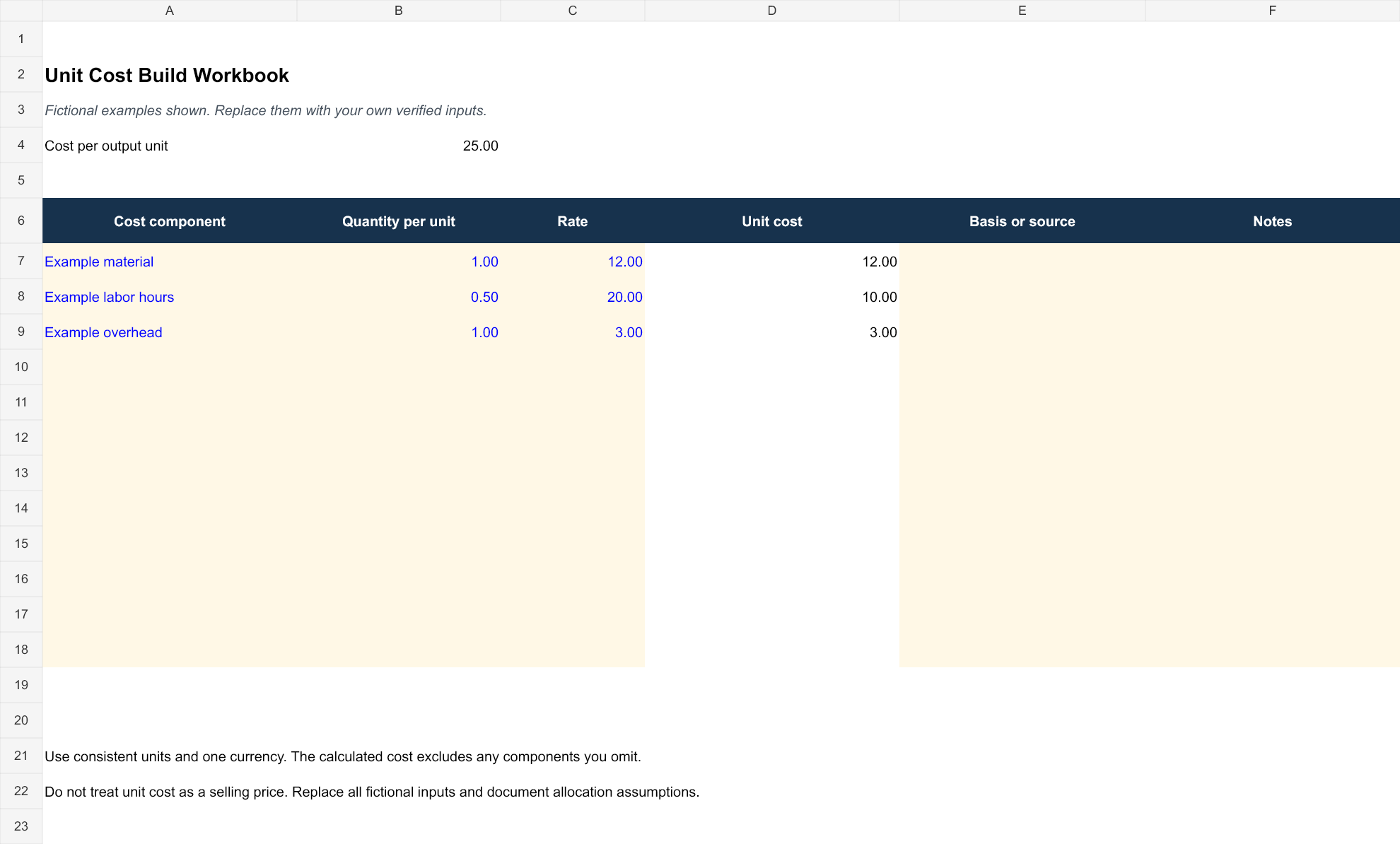
Download Unit Cost Build Workbook (XLSX)
Budget Versus Actual Cost Workbook
Compare matching budget and actual expenses with amount and percentage variances.
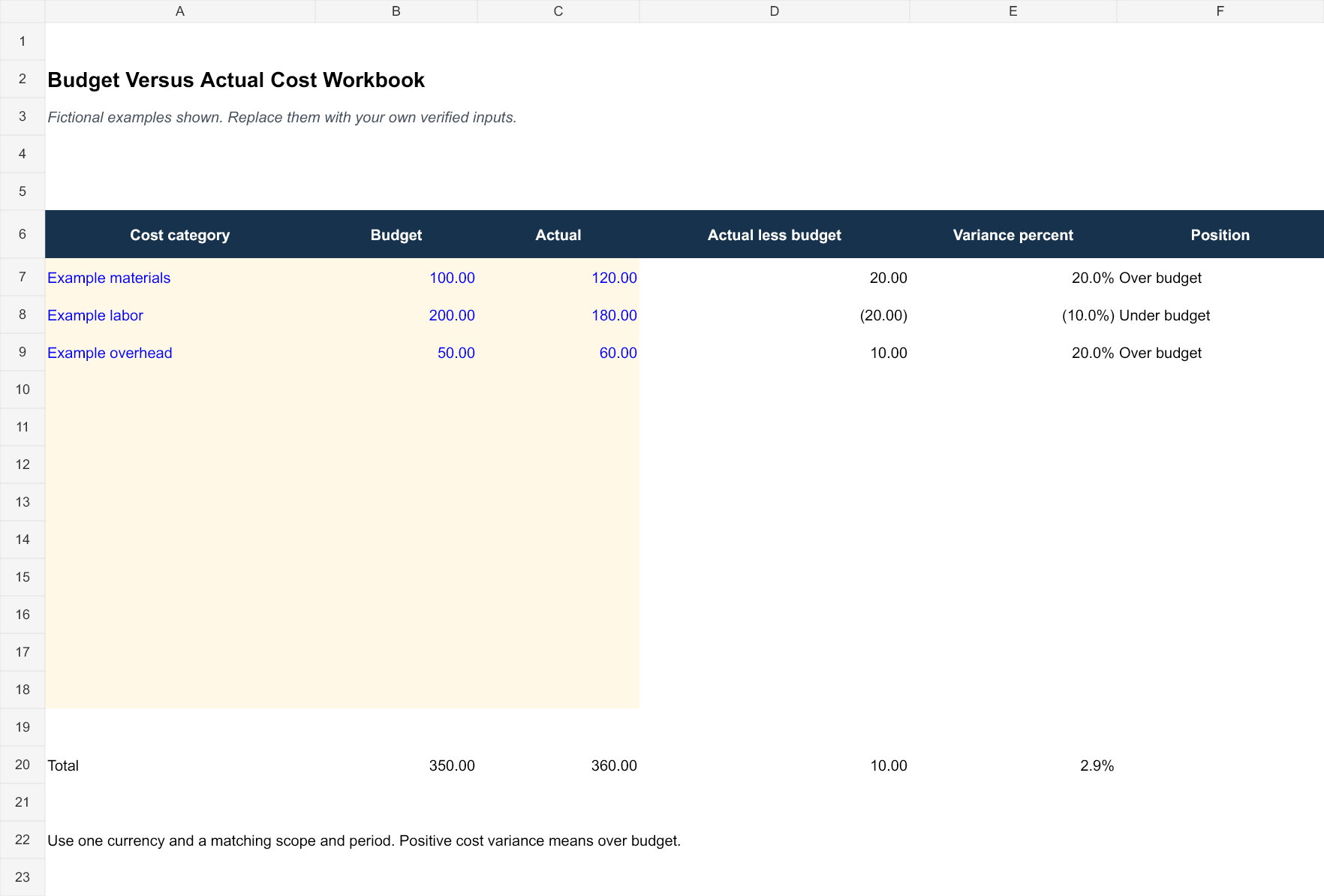
Download Budget Versus Actual Cost Workbook (XLSX)
How to use the new downloads
The unit-cost sheet separates editable quantities and rates from calculated line costs and flags missing required inputs. The variance sheet compares actual amounts against budgets for the same scope and period; positive cost variance means over budget. A zero budget produces an unavailable percentage rather than a fabricated percentage result.
The fictional unit-cost example combines 12 of material cost, 10 of labor, and 3 of overhead for 25 per output unit. That total excludes any omitted component and is not a selling price. Replace the examples, document allocation assumptions, keep one currency per worksheet, and review the twelve provided rows before relying on the calculated result.
What Is a Cost Analysis Spreadsheet?
A cost analysis spreadsheet is a worksheet used to break down and evaluate expenses. Depending on its purpose, it can include categories such as materials, labor, equipment, transportation, overhead, services, administrative costs, and other expenses.
A cost analysis template in Excel can make calculations easier by allowing formulas to calculate subtotals, totals, differences, percentages, and other financial figures. You can also sort or organize information according to your particular project or business requirements.
Free Cost Analysis Template
A free cost analysis template provides a ready-made structure for analyzing expenses without creating a spreadsheet from scratch. You can enter your own cost categories, estimated amounts, actual expenses, quantities, rates, and other financial information.
A well-organized cost analysis form can also make it easier to identify areas where actual spending is higher or lower than expected. This information can support budgeting and financial decision-making.
Cost Analysis for Business and Projects
Businesses can use a business cost analysis spreadsheet to evaluate operating expenses, production costs, service costs, or potential investments. Project managers can use a project cost analysis template to compare planned expenses with actual spending throughout a project.
Cost analysis can also help when comparing suppliers, evaluating alternative solutions, estimating project profitability, or determining whether a proposed activity is financially practical.
Cost Benefit and Cost Comparison Analysis
A cost comparison spreadsheet can help compare two or more alternatives based on their expected expenses. For example, a business may compare different suppliers, materials, equipment options, or service providers.
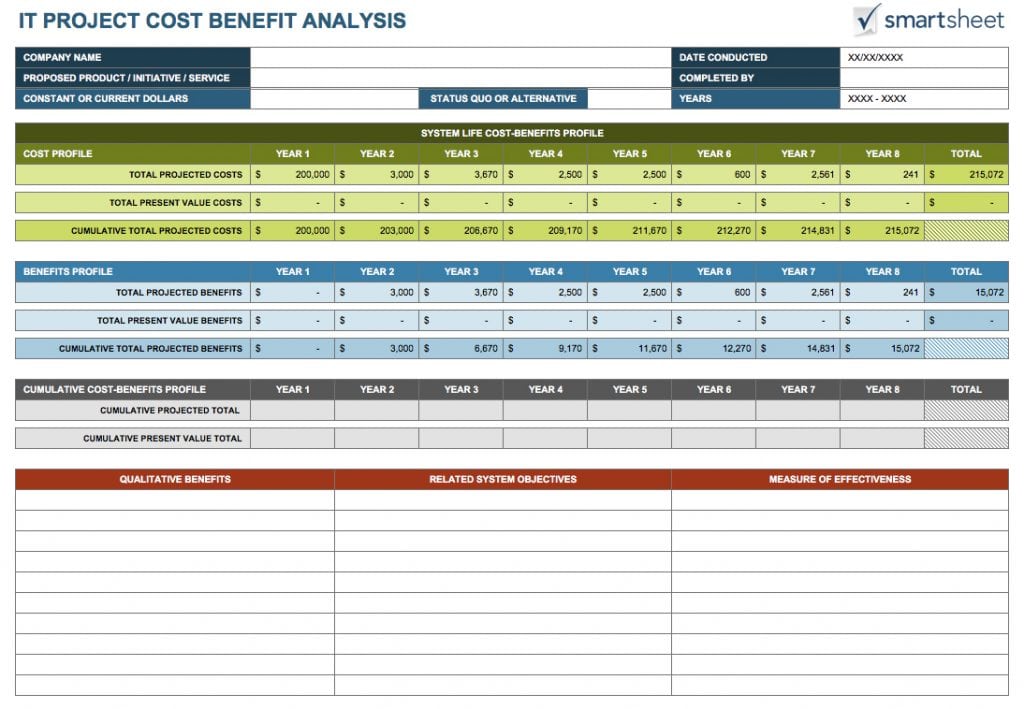
A cost-benefit analysis template takes the process further by comparing expected costs with anticipated benefits. This can help decision-makers evaluate whether an investment or project is likely to provide sufficient value.
The results should be based on reliable estimates and realistic assumptions. A spreadsheet can organize the analysis, but the quality of the conclusion depends on the accuracy of the information entered.
Editable Cost Analysis Spreadsheet
An editable cost analysis spreadsheet template can be customized according to the type of costs being evaluated. You can add or remove categories, change calculations, include company information, and create additional columns for quantities, unit costs, estimates, actual costs, and variances.
Keeping the spreadsheet updated as new information becomes available can make the analysis more useful for ongoing projects and business decisions.
A standardized cost analysis Excel template can also save time when similar financial evaluations need to be performed repeatedly.
Define a comparable scope
Write what the analysis covers, its period, currency, quantity units, and the alternatives being compared. “Office equipment” is too broad if the decision concerns five specific workstations for one year. A clear scope lets a reviewer see whether every option is being evaluated for the same requirement.
List included and excluded cost categories. Setup, training, delivery, consumables, maintenance, and recurring service charges may matter depending on the actual decision. Do not automatically include every possible category, but do not omit a relevant one from only the less attractive option. Explain exclusions that could affect the comparison.
Keep quantities and pricing units together. A price per box cannot be multiplied by a quantity of individual items without conversion. Similarly, a monthly service price and an annual price need a common period before their totals can be compared. Name the unit rather than hiding it in a note far from the amount.
Record sources and assumptions beside the inputs
For a quoted amount, record the quote reference, date, relevant quantity, and any conditions that affect its use. For an internal estimate, explain the basis and who supplied it. A blank source column beside a highly precise figure is a useful signal that the estimate needs review.
Distinguish known inputs from uncertain ones. A fixed offer valid for a stated period differs from an assumed future usage quantity. Mark assumptions explicitly and record what information could replace them. Do not fill an unknown cost with zero unless zero is actually supported; otherwise the spreadsheet can make an incomplete option appear cheaper.
The US GAO’s cost-estimating guide includes scope, assumptions, data collection, sensitivity analysis, documentation, and updates using actual costs among its steps. A simple business worksheet need not copy a large program model, but it should make its own inputs and limitations understandable.
Fictional comparison: two label-supply options
Consider an invented office comparing label supplies for the same annual requirement. Option A has an illustrative setup cost of 60 and consumables estimated at 20 per month, giving 60 plus 12 times 20, or 300 for the stated year. Option B has setup of 120 and consumables estimated at 12 per month, giving 120 plus 144, or 264.
On those assumptions, Option B’s modeled cost is 36 lower for that year. That conclusion concerns the included categories and the specified usage assumption. It does not establish that Option B has better reliability, service, availability, or suitability. Record those criteria separately where they matter to the decision.
Now change only Option B’s consumables assumption from 12 to 16 per month. Its modeled annual total becomes 120 plus 192, or 312. Holding the other inputs constant, the comparison changes: Option B becomes 12 higher than Option A. This is an illustrative sensitivity check, not a forecast or a recommendation to buy either option.
The example excludes applicable taxes, delivery, maintenance, and other costs because it is a simplified arithmetic demonstration. A real comparison needs the categories and treatment relevant to the actual purchase. The important result is that the choice depends on inputs that should be visible, not that one invented supplier is universally better.
Distinguish cost comparison from benefit claims
A cost comparison asks how the included expenses differ. A cost-benefit analysis also examines the benefits and the basis for valuing them. A lower total does not automatically mean better value, and a claimed time saving does not automatically become cash income.
If the analysis includes time saved, identify the assumed hours, the role affected, the basis for the estimate, and how the benefit will be used. Avoid counting the same saving both as reduced labor cost and as an additional benefit unless the method justifies it. A benefit that cannot reasonably be expressed in money can remain a separately described consideration.
Keep evidence and expectations distinct. An observed result from a limited trial should identify its scope, while a future expectation should be labeled as an assumption or projection. The spreadsheet can calculate the consequences of an input; it cannot prove that the input will occur.
Compare estimates and actual costs consistently
For a continuing project, retain the approved estimate or baseline and record actual costs separately. Define what counts as actual in the organization’s process and use the supporting references. A purchase order, invoice, and payment describe different stages; do not add all three as separate costs for the same item.
Choose and label the variance calculation. If you use actual minus estimated cost, an estimate of 500 and actual cost of 540 give a variance of positive 40. Explain whether positive indicates spending above the estimate. A different sign convention can work, but readers should not have to guess how the value is interpreted.
Reference a purchase order where it supports the commitment or source trail, without treating the order alone as proof of payment. If actual costs are not yet complete, state the cutoff date and remaining assumptions. A partial-period actual total should not be compared with a full-year estimate as though both covered the same period.
Review the workbook and communicate the conclusion
Inspect the adopted file’s formulas, input cells, total ranges, and unit conversions. Confirm that added rows are included and that subtotals are not counted again in a grand total. A formula result with many decimal places does not make an uncertain input more accurate; use a presentation that matches the underlying information.
Keep assumptions readable in the exported or printed view. A comparison that shows only the final totals can hide differences in scope or period. Include the date or version and identify the person responsible for unresolved inputs so another reviewer can follow up on the uncertainty.
State the conclusion with its limits. “Option B is lower under the listed annual usage assumptions” is more accurate than “Option B will always save money.” Explain which inputs could change that conclusion and what further information is needed. The worksheet supports a decision; it does not approve a purchase, guarantee savings, or replace the organization’s review process.
Below Are Cost Analysis Spreadsheet Templates

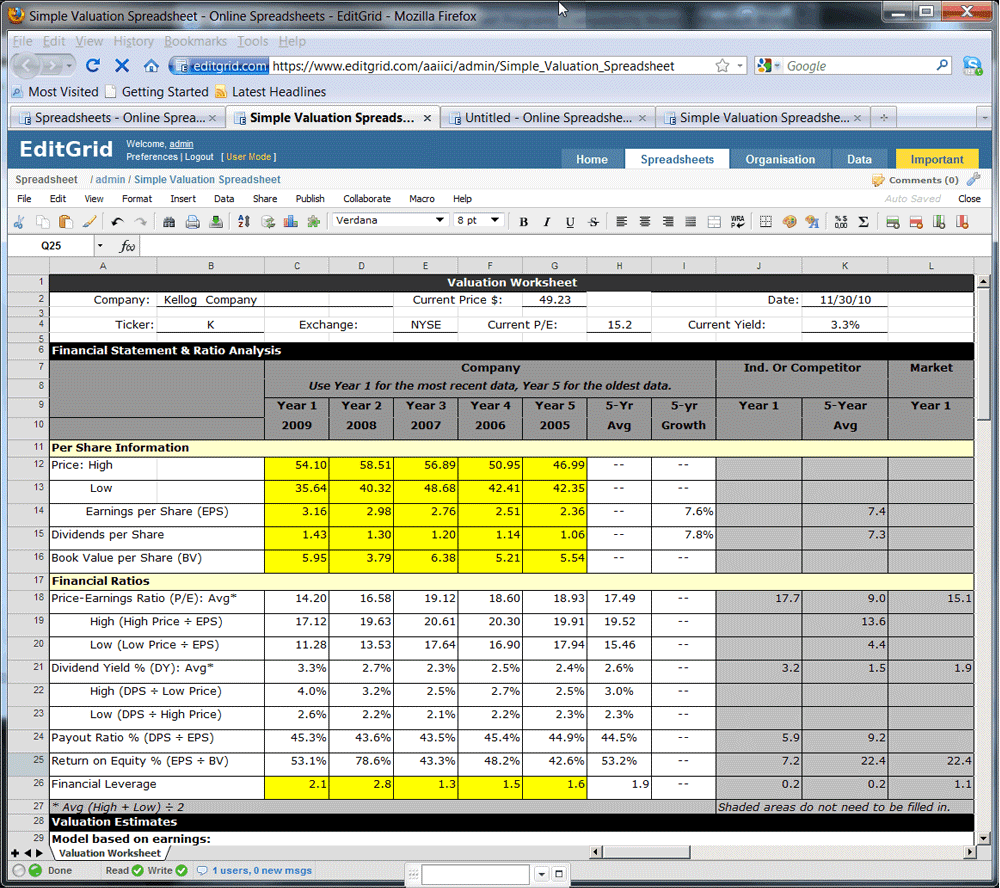
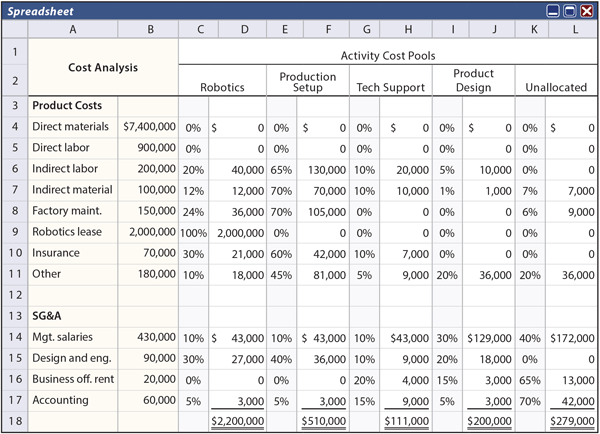
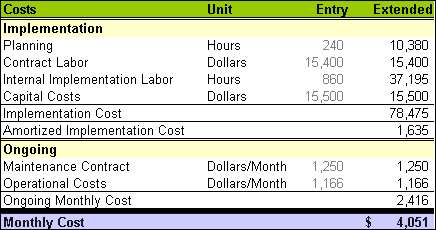
Frequently Asked Questions
What formats are the two new downloads?
The two new downloads are Excel XLSX workbooks with formulas and fictional example inputs. Replace those examples, preserve the calculated cells and review your results. They are separate from the mixed resources in the original gallery.
What should I define before entering costs?
State the decision, scope, period, currency, alternatives, quantity units, and included categories. Those details make the figures comparable.
Can I use zero for an unknown amount?
Only if zero is supported. Otherwise label the input as unknown or estimated so the missing cost does not make an option appear artificially cheaper.
How do I compare monthly and annual prices?
Convert them to the same clearly stated period and include the categories relevant to both options. Keep the original pricing basis and source visible.
What is a simple sensitivity check?
Change one uncertain input while holding the other inputs constant, then examine how the result changes. Record the altered assumption rather than presenting the scenario as a forecast.
Is a lower cost total automatically the best option?
No. Suitability, reliability, constraints, and benefits may matter separately. A cost total covers only the defined inputs and categories.
Should I add a purchase order, invoice, and payment as three costs?
Avoid counting the same underlying item repeatedly. Those records describe different stages and should support the source trail under the actual process.
How should I explain a variance?
State the calculation and sign convention. For actual minus estimate, a positive amount indicates actual spending above the estimate; keep both periods and scopes comparable.